
LitAPI
Use LitAPI to define the core steps of serving a model: one-time setup, decoding requests, running predictions, and encoding responses. Once these are defined, LitServe automatically scales the process, handling batching, streaming, GPU scaling and more.. It’s simple enough for beginners and flexible for experts.
Example:
import litserve in ls

class SimpleLitAPI(ls.LitAPI):
    # Called once at startup. Setup models, DB connections, etc...
    def setup(self, device):
        self.model = lambda x: x**2

    # Convert the request payload to model input.
    def decode_request(self, request):
        return request["input"]

    # Run inference on the the model, return the output.
    def predict(self, x):
        return self.model(x)

    # Convert the model output to a response payload.
    def encode_response(self, output):
        return {"output": output}

# LitServe scales your API!
server = ls.LitServer(api)
server.run(port=8000)
Lifecycle
This section describes the sequence by which LitAPI methods are called.
Not batched
When a server is not using batching, it processes one input at a time:
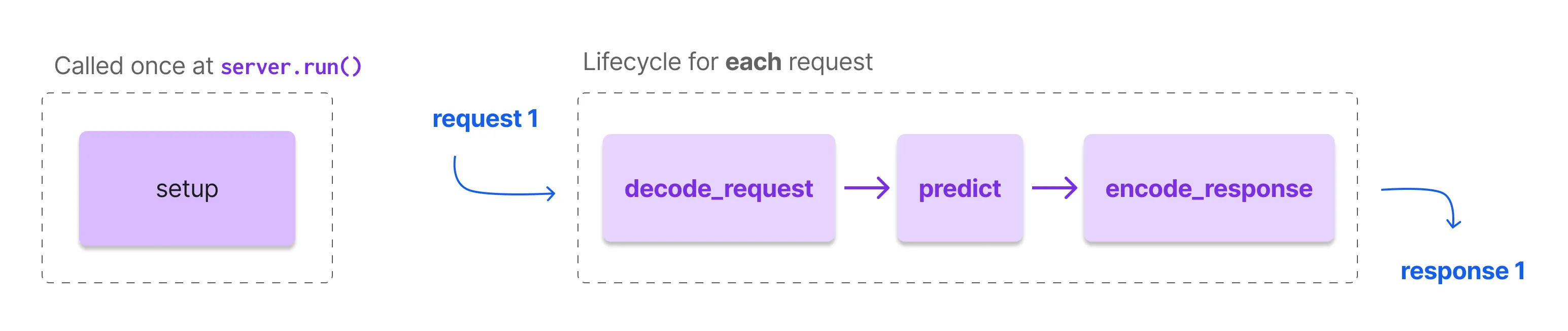
setup is called once at the beginning when the server starts. Use setup to:
- load data
- initialize models
- setup database connections
- load embeddings
- etc...
Once the server has initialized, for each request, it calls the following methods in this order:
decode_request: Convert incoming request payloads into model-ready inputs.predict: Runs inference on the model(s) using the output of decode_request.encode_response: Converts the output of predict into a response payload.
Batched
When batching is enabled, the server groups requests up to max_batch_size and sends them together to the predict method.
Simply put, the output of decode_request is grouped up to the batch size. Then that group is sent to the predict method.

setup is called once at the beginning when the server starts. Use setup to:
- load data
- initialize models
- setup database connections
- load embeddings
- etc...
Once the server has initialized, when batching is enabled, the server groups *n *requests specified in LitServer(max_batch_size=n) into a *batch *and sends the batch all at once through LitAPI in this order:
decode_request: Convert incoming request payloads into model-ready inputs.batch: Optionally define how to group the multiple requests. When not specified, LitServe uses heuristics to automatically do it.predict: Runs inference on the model(s) using the output of decode_request.unbatch: Optionally define how to map a batch to individual responses. When not specified, LitServe uses heuristics to automatically do it.encode_response: Converts the output of predict into a response payload.
Parameters
These are all the available LitAPI parameters and the default values.
from litserve import LitAPI

LitAPI(
    max_batch_size: int = 1,
    batch_timeout: float = 0.0,
    api_path: str = "/predict",
    stream: bool = False,
    loop: Optional[Union[str, LitLoop]] = "auto",
    spec: Optional[LitSpec] = None,
    enable_async: bool = False
)
max_batch_size
The max number of requests to batch together. Batching groups requests and sends them to the model at once in a batch. This allows the model to use all available GPU cores to process requests faster. This is the simplest way to increase the throughput of a server.
from litserve import LitAPI

# the default is to process every request independently (ie: no batching)
api = LitAPI(max_batch_size=1)

# batch requests in sets of 32
api = LitAPI(max_batch_size=32)
Example: This example batches requests into sets of 32.
import litserve as ls

api = ls.examples.SimpleLitAPI(max_batch_size=32)
server = ls.LitServer(api)
server.run(port=8000)
batch_timeout
The timeout (in seconds) until the server stops waiting to batch inputs.
from litserve import LitAPI

# wait indefinitely to fill up the batch (default)
api = LitAPI(batch_timeout=0.0)

# send whatever is in the batch after 0.01s of waiting
api = LitAPI(batch_timeout=0.01)
Example: Here we set the batch size to 32. If the batch is not filled up within 0.01 seconds, then whatever is in the batch will be processed.
import litserve as ls

api = ls.examples.SimpleLitAPI(max_batch_size=32, batch_timeout=0.01)
server = ls.LitServer(api)
server.run(port=8000)
api_path
The URL path for the endpoint.
from litserve import LitAPI

# the API is served from /predict (default)
api = LitAPI(api_path='/predict')

# name the API to something different ('/embed')
api = LitAPI(api_path='/embed')
Example: This example deploys the API under a path called /embed.
import litserve as ls

api = ls.examples.SimpleLitAPI(api_path='/embed')
server = ls.LitServer(api)
server.run(port=8000)
stream
Enable LitServe to stream responses iteratively rather than all at once.
from litserve import LitAPI

# By default streaming is off
api = LitAPI()

# Enable streaming and send responses iteratively
api = LitServer(stream=True)
Example: This example streams digits from 1 to 10.
import litserve as ls

class SimpleStreamAPI(ls.LitAPI):
    def setup(self, device):
        self.model = lambda x: x

    def decode_request(self, request):
        return request["input"]

    def predict(self, x):
        for i in range(10):
            yield self.model(i)

    def encode_response(self, output):
        for out in output:
            yield {"output": out}

if __name__ == "__main__":
    api = SimpleStreamAPI(stream=True)
    server = ls.LitServer(api)
    server.run(port=8000)
spec
spec defines the API's input-output structure and behavior, enabling compatibility with standards like OpenAI chat or embedding APIs.
import litserve as ls

# Enable OpenAI chat completion API standard
api = ls.LitAPI(spec=ls.OpenAISpec())

# Enable OpenAI Embeddings API standard
api = ls.LitAPI(spec=ls.OpenAIEmbeddingSpec())
Example: This example sets up a simple server compatible with OpenAI's chat completion API.
import litserve as ls

class SimpleLitAPI(ls.LitAPI):
    def predict(self, prompt):
        yield "Hello, this is a response!"

if __name__ == "__main__":
    api = SimpleLitAPI(spec=ls.OpenAISpec())
    server = ls.LitServer(api)
    server.run(port=8000)
enable_async
LitServe supports both synchronous and asynchronous method implementations in the LitAPI class. By default, it runs in synchronous mode. To use async methods, pass enable_async=True when initializing the API.
server = ls.LitServer(AsyncAPI(enable_async=True))Example: In this code, each prediction takes 2 seconds without blocking other requests.
import litserve as ls
import asyncio

class AsyncAPI(ls.LitAPI):
    def setup(self, device):
        self.model = None

    async def decode_request(self, request):
        return request["input"]

    async def predict(self, x):
        await asyncio.sleep(2)  # fake network, i/o call
        return x**2

    async def encode_response(self, output):
        return {"output": output}

if __name__ == "__main__":
    server = ls.LitServer(SimpleLitAPI(enable_async=True))
    server.run(port=8000)
Methods (required)
The following methods are required in your LitAPI definition.
setup
setup is called once at the start of the server's lifecycle. Use setup to initialize models, databases, caches, and any other necessary systems. This centralizes all setup tasks, simplifying complex configurations like multiple models or external resources.
def setup(self, device: str)Parameters
Example: This example shows how to use devices with PyTorch-based models (e.g., PyTorch, PyTorch Lightning, Hugging Face) in the setup method of LitAPI. It demonstrates setting up multiple components (model, preprocess steps, text embeddings) on a specified device (CPU or GPU) to optimize inference.
# pip install torch clip
import torch, clip, multiprocessing
from PIL import Image
from io import BytesIO
import litserve as ls

class CLIPAPI(ls.LitAPI):
    def setup(self, device):
        # load the model on the device automatically (CPU, GPU etc...)
        self.model, self.preprocess = clip.load("ViT-B/32", device=device)

        # Load candidate captions
        with open('captions.txt', 'r') as file:
            self.candidate_captions = [line.strip() for line in file.readlines()]

        # Pre-tokenize and pre-encode text captions
        with torch.no_grad():
            self.text_tokens = clip.tokenize(self.candidate_captions).to(self.device)
            self.text_embeddings = self.model.encode_text(self.text_tokens)

    def decode_request(self, request):
        image_bytes = bytes.fromhex(request["image_bytes"])
        image = Image.open(BytesIO(image_bytes))
        return self.preprocess(image).unsqueeze(0).to(self.device)

    def predict(self, image_tensor):
        with torch.no_grad():
            image_embedding = self.model.encode_image(image_tensor)
            similarities = (100.0 * image_embedding @ self.text_embeddings.T).softmax(dim=-1)
            max_indices = similarities.argmax(dim=-1)

            return [self.candidate_captions[idx] for idx in max_indices.cpu().numpy()]

    def encode_response(self, output):
        return {"description": output[0]}

if __name__ == "__main__":
    api = CLIPAPI()
    server = ls.LitServer(api, accelerator="auto")
    server.run(port=8000)
decode_request
Use this method to convert incoming request payloads into model-ready inputs. Type annotate the request argument to enforce a particular input format such as dict, or a Pydantic class like FastAPI.
def decode_request(self, request)Parameters
Example: This example shows how to use decode_request to transform raw inputs (such as text) into model-ready formats like tensors or dictionaries. In this case, the BERT tokenizer converts the input text into tensors for model inference.
import torch
from transformers import AutoTokenizer, AutoModelForSequenceClassification
import litserve as ls

class BERTLitAPI(ls.LitAPI):
    def setup(self, device):
        self.tokenizer = AutoTokenizer.from_pretrained("bert-base-uncased")
        self.model = AutoModelForSequenceClassification.from_pretrained("bert-base-uncased")
        self.model.to(device)
        self.model.eval()

    def decode_request(self, request):
        # Use decode request to convert raw inputs (bytes, text, files) into models inputs (tensor, dictionaries, etc...)
        text = request["text"]
        inputs = self.tokenizer(text, return_tensors="pt", padding=True, truncation=True, max_length=512)
        return inputs

    def predict(self, inputs):
        with torch.no_grad():
            inputs = {k: v.to(self.model.device) for k, v in inputs.items()}
            outputs = self.model(**inputs)
        return outputs.logits

    def encode_response(self, logits):
        probabilities = torch.nn.functional.softmax(logits, dim=-1)
        response = {
            "positive": probabilities[:, 1].item(),
            "negative": probabilities[:, 0].item()
        }
        return response

if __name__ == "__main__":
    api = BERTLitAPI()
    server = ls.LitServer(api)
    server.run(port=8000)
predict
Runs inference on the model(s) using the output of decode_request. If batching is enabled, the inputs are automatically batched before this step. The method returns (or yields) the results from the model. It yield the results when streaming is enabled.
def predict(self, inputs)Parameters
Example: This example shows how predict simplifies complex logic, using multiple components to generate image embeddings, compute similarities with text embeddings, and return relevant captions. It highlights the flexibility to handle advanced workflows beyond a single model.
# pip install torch clip
import torch, clip, multiprocessing
from PIL import Image
from io import BytesIO
import litserve as ls

class CLIPAPI(ls.LitAPI):
    def setup(self, device):
        self.device = device
        self.model, self.preprocess = clip.load("ViT-B/32", device=device)
        with open('captions.txt', 'r') as file:
            self.candidate_captions = [line.strip() for line in file.readlines()]
        with torch.no_grad():
            self.text_tokens = clip.tokenize(self.candidate_captions).to(self.device)
            self.text_embeddings = self.model.encode_text(self.text_tokens)

    def decode_request(self, request):
        image_bytes = bytes.fromhex(request["image_bytes"])
        image = Image.open(BytesIO(image_bytes))
        return self.preprocess(image).unsqueeze(0).to(self.device)

    def predict(self, image_tensor):
        with torch.no_grad():
            # create an image embedding first
            image_embedding = self.model.encode_image(image_tensor)

            # compute similarities with other vectors (very similar to what a vector DB does)
            similarities = (100.0 * image_embedding @ self.text_embeddings.T).softmax(dim=-1)
            max_indices = similarities.argmax(dim=-1)

            # return the top captions that closely match the image. this is a list of strings
            captions = [self.candidate_captions[idx] for idx in max_indices.cpu().numpy()]
            return captions

    def encode_response(self, output):
        return {"description": output[0]}

if __name__ == "__main__":
    api = CLIPAPI()
    server = ls.LitServer(api, accelerator="auto")
    server.run(port=8000)
encode_response
Converts the output of predict into a response payload. The payload is a structured format (like JSON) that the server sends back to the client.
def encode_response(self, output)Parameters
Example: This example demonstrates decode_request for an image generation API, showcasing complex logic for Stable Diffusion. It's an extreme case compared to simpler examples that typically return text or numbers.
import torch, base64
from diffusers import StableDiffusionPipeline
from io import BytesIO
import litserve as ls

class StableDiffusionLitAPI(ls.LitAPI):
    def setup(self, device):
        self.model = StableDiffusionPipeline.from_pretrained("stabilityai/stable-diffusion-2-1", torch_dtype=torch.float16, use_auth_token=True).to(device)

    def decode_request(self, request):
        prompt = request["prompt"]
        return prompt

    def predict(self, prompt):
        with torch.no_grad():
            images = self.model(prompt, num_inference_steps=50, guidance_scale=7.5)["images"]
            image = images[0]  # Assuming you want to retrieve the first image
        return image

    def encode_response(self, image):
        # Convert the generated PIL Image to a Base64 string
        buffered = BytesIO()
        image.save(buffered, format="PNG")
        img_str = base64.b64encode(buffered.getvalue()).decode("utf-8")

        return {"image": img_str}

if __name__ == "__main__":
    api = StableDiffusionLitAPI()
    server = ls.LitServer(api)
    server.run(port=8000)
Methods (optional)
The following methods are optional. Use these to get fine-grained control over parts of the request lifecycle.
batch
The batch method combines individual inputs from decode_request into a single batch before passing them to predict. It ensures that inputs are processed together, which is essential for handling multiple requests efficiently. (Order: decode_request, batch, predict).
def batch(self, inputs)Parameters
Example: This example customizes the `batch` and `unbatch` methods using `np.stack` to group inputs and split outputs. It demonstrates batched processing with a specified maximum batch size and timeout, but can be adapted for other frameworks like PyTorch. Batching is only called if `max_batch_size` is more than 1.
import numpy as np
import litserve as ls

class CustomBatchedAPI(ls.examples.SimpleBatchedAPI):
    def batch(self, inputs):
        return np.stack(inputs)

    def unbatch(self, output):
        return list(output)

if __name__ == "__main__":
    api = CustomBatchedAPI(max_batch_size=8, batch_timeout=0.05)
    server = ls.LitServer(api)
    server.run(port=8000)
unbatch
The unbatch method splits the batched output from the predict method into individual results before passing them to encode_response. It ensures each output is handled separately, making it useful for processing and returning multiple results. Order: (predict, unbatch, encode_response).
def unbatch(self, output)Parameters
Example: This example shows how to use the unbatch method to split batched outputs into individual results. You can use this to convert PyTorch tensors, NumPy arrays etc into a Python list.
import numpy as np
import litserve as ls

class CustomBatchedAPI(ls.examples.SimpleBatchedAPI):
    def batch(self, inputs):
        return np.stack(inputs)

    def unbatch(self, output):
        return list(output)

if __name__ == "__main__":
    api = CustomBatchedAPI(max_batch_size=8, batch_timeout=0.05)
    server = ls.LitServer(api)
    server.run(port=8000)
Properties
device
The current device this server is running on (CPU, GPU, MPS). If GPU, it also has the index of the GPU on that machine.
Example: This example shows how to use the device property to access the current device in any LitAPI method like decode_request, predict, etc...
import litserve as ls

class SimpleLitAPI(ls.LitAPI):
    def setup(self, device):
        self.model = lambda x: x**2

    def decode_request(self, request):
        # ask for the device anywhere
        my_device = self.device
        return request["input"]

    def predict(self, x):
        # ask for the device anywhere
        my_device = self.device
        return self.model(x)

    def encode_response(self, output):
        # ask for the device anywhere
        my_device = self.device
        return {"output": output}

if __name__ == "__main__":
    api = SimpleLitAPI()
    server = ls.LitServer(api, accelerator="auto")
    server.run(port=8000)
stream
Indicates whether streaming is enabled. This property allows any method to determine if the API is set to return results incrementally rather than all at once. Access this property from any method to tailor behavior based on the streaming mode.
Example: In this example, self.stream is accessed from various methods to adapt the API's behavior based on whether streaming is enabled.
import litserve as ls

class SimpleLitAPI(ls.LitAPI):
    def setup(self, device):
        self.model = lambda x: x**2

    def decode_request(self, request):
        # Check if streaming is enabled
        is_streaming = self.stream
        return request["input"]

    def predict(self, x):
        # Check if streaming is enabled
        is_streaming = self.stream
        return self.model(x)

    def encode_response(self, output):
        # Check if streaming is enabled
        is_streaming = self.stream
        return {"output": output}

if __name__ == "__main__":
    api = SimpleLitAPI()
    server = ls.LitServer(api, accelerator="auto")
    server.run(port=8000)
Was this page helpful?
Thanks for the feedback.