
Benchmarks
LitServe, built on FastAPI, delivers faster model serving with features like streaming, batching, and multi-GPU support, outperforming both FastAPI and TorchServe.
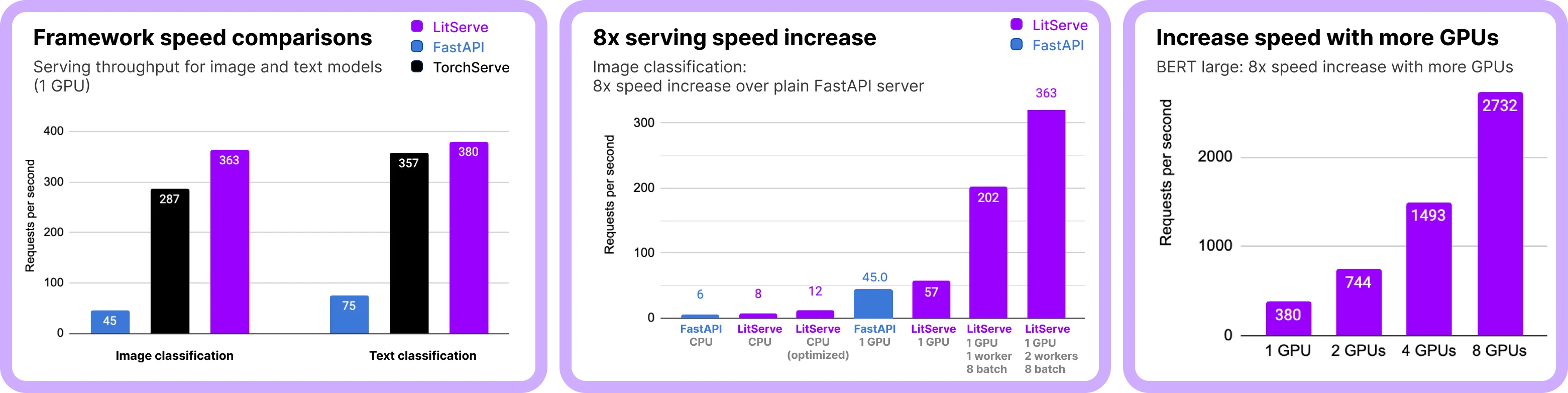
Note on LLM serving: For high-performance LLM serving (like Ollama/vLLM), use LitGPT or build your custom vLLM-like server with LitServe. Optimizations like kv-caching, which can be done with LitServe, are needed to maximize LLM performance.
In this section, we measure the performance of LitServe for different types of models, vision, text and generative models and report the following metrics:
- Throughput: How many requests the server can handle per second.
- Latency: The time taken to process a single request.
- Resource utilization: How well does LitServe use CPUs and GPUs.
- Scalability: How well LitServe performs as the number of concurrent requests increases.
- Generations: For generative models, how fast they generate responses (e.g. tokens per second, images per second).
Summary results
Here's a summary of results across each model type. Detailed results are described in the rest of this post.
Vision
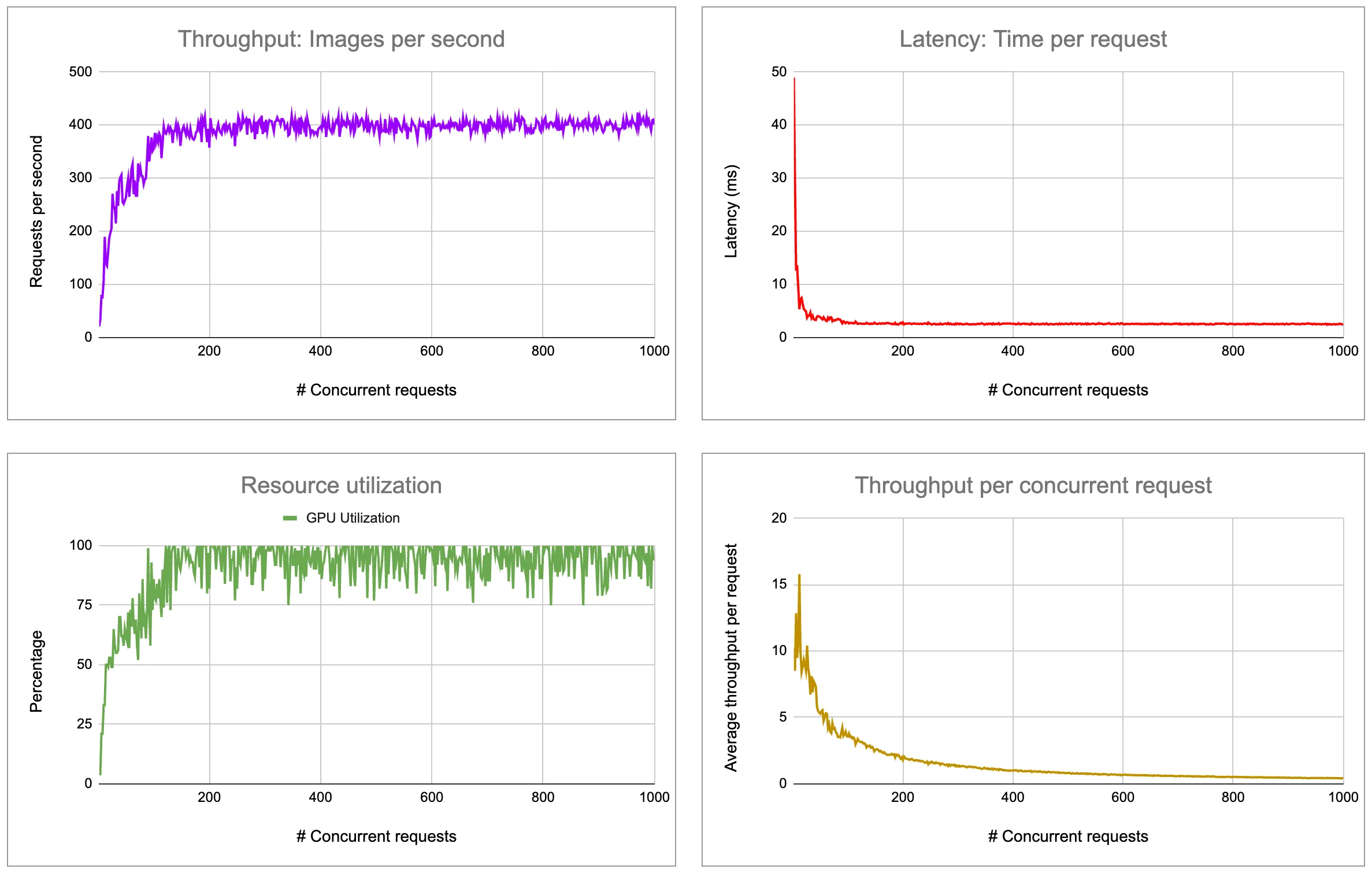
Check out the benchmarking Studio to reproduce these results. More detailed results are presented below.
Text
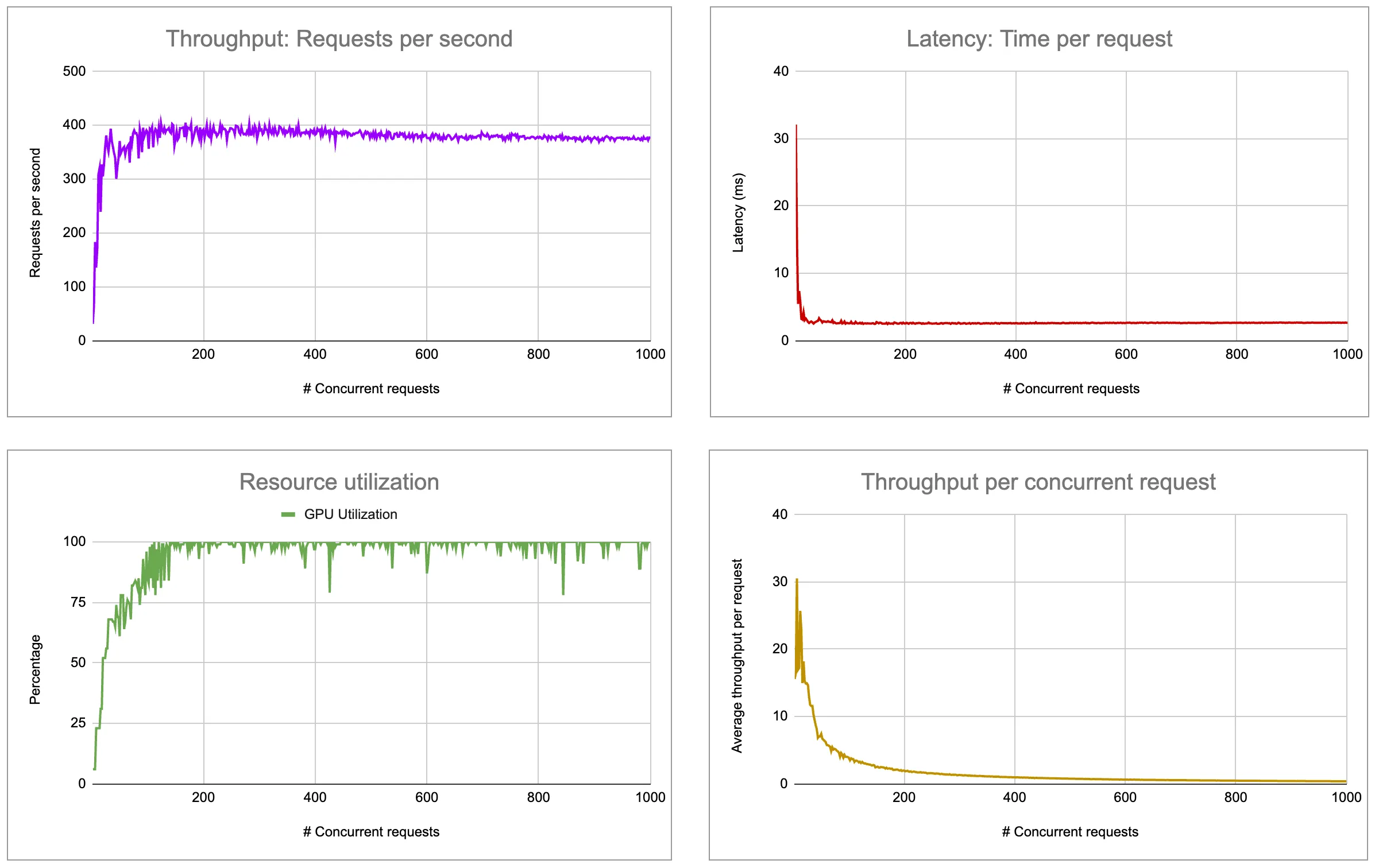
Check out the benchmarking Studio to reproduce these results. More detailed results are presented below.
LLMs
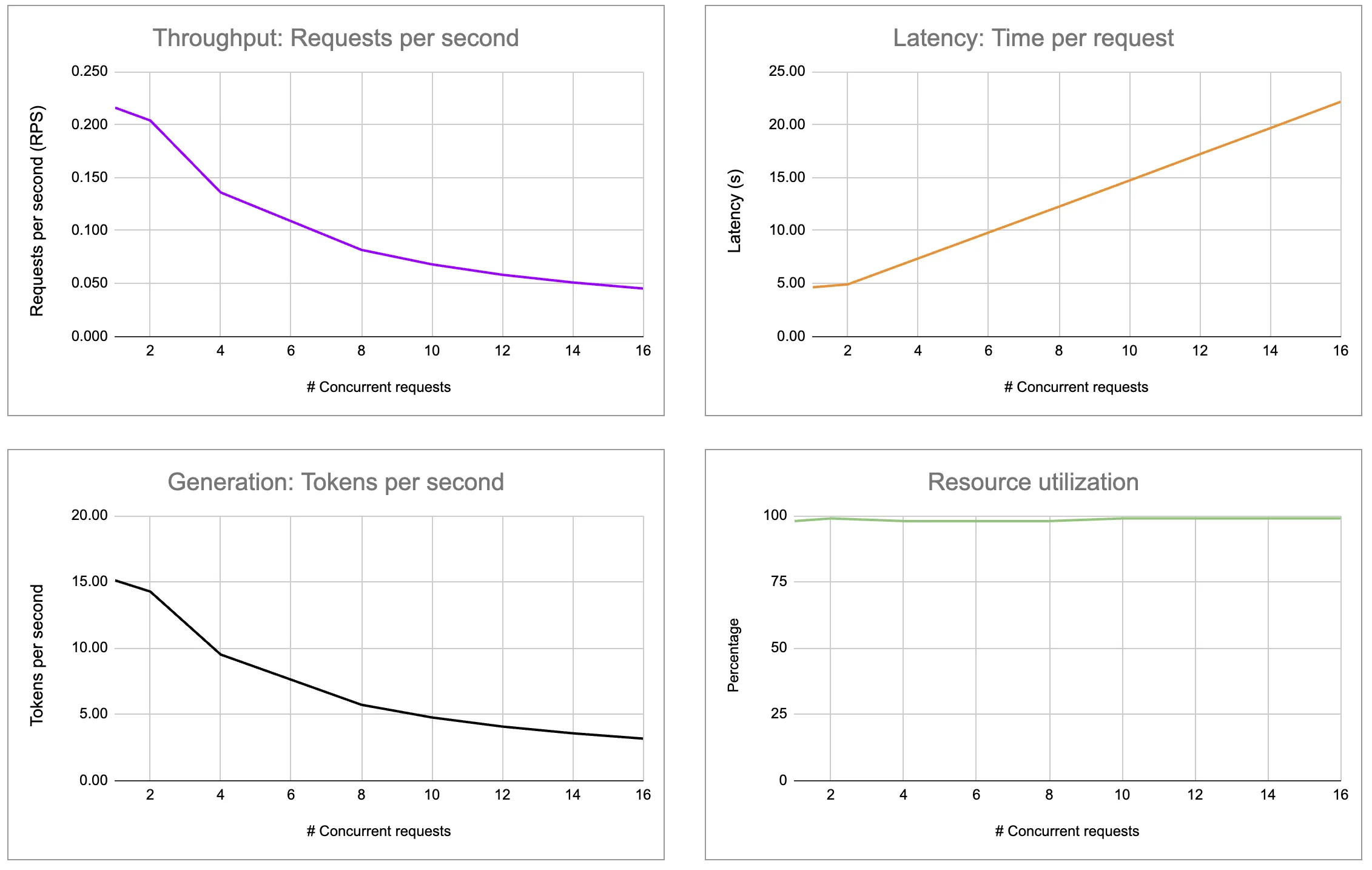
Check out the Llama 3 benchmarking Studio to reproduce these results. More detailed results are presented below.
(Note: LitServe will soon be adding optimizations to scale LLM serving.)
Experimental setup
This section describes how we structured each metric and what we measured.
Throughput
Throughput refers to the rate at which an API can process incoming requests over a specific period of time. It is measured in r*equests per second *(RPS).
Latency
The time taken for a single request to be processed by the API. It's usually measured in milliseconds (ms) and can be further broken down into:
- Average latency: The mean time taken to process all requests.
- P99 latency: The latency below which 99% of the requests fall, useful for understanding the worst-case performance.
- P95 latency: This latency is particularly useful in understanding the performance of an API under normal operating conditions. It helps identify the response time that most users typically experience, excluding outliers and extreme cases.
Resource utilization
Resource utilization refers to the efficient and effective use of a system's resources (such as CPU, GPU, and RAM usage) to achieve desired performance levels. It measures how well the available resources are being used to process tasks, handle workloads, and deliver services.
Scalability
Scalability is the measure of how well a system maintains or improves its performance and efficiency as the number of concurrent requests increases. It indicates the system's ability to handle growth in workload or user demand without degrading performance, ensuring consistent and reliable operation under varying levels of load.
Concurrency
Concurrency refers to the capability of an API to process multiple requests at the same time. It involves handling multiple requests without waiting for each request to complete before starting the next one.
Generations
For models that generate text, images, or audio, the speed of generation is measured in terms of output units per second. Examples of output speed units are:
- Tokens per second: The number of tokens (words, characters, or subwords) a text-generation model can produce in one second.
- Time per token output: The average time required to generate one token from a text-generation model.
- Images per second: The number of images an image-generation model can produce in one second.
- Audio samples per second: The number of audio samples or frames an audio-generation model can produce in one second.
Experiments
Text classification
Text classification is used to predict a label (e.g. sentiment) for a given text. We use BERT Large, a 336M parameter model pre-trained on English language data, which excels in downstream tasks such as text classification.
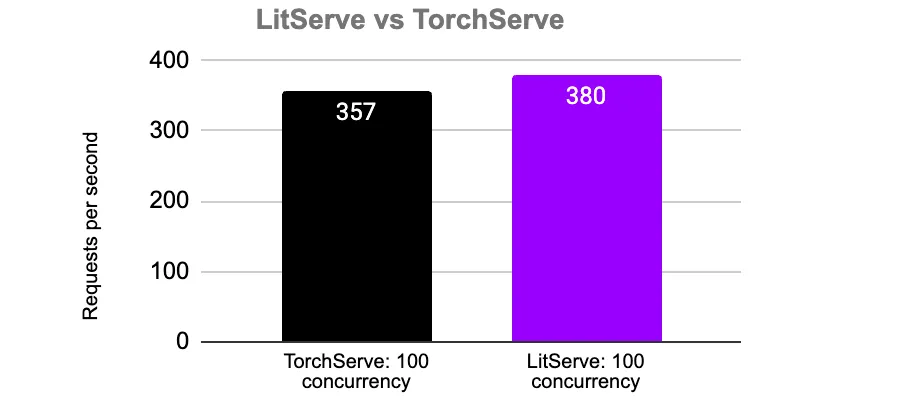
For comparison, we measured the throughput of a similar framework, TorchServe, on the same text classification task. LitServe achieves performance on par with TorchServe, with 6.3% higher throughput under the same configuration.
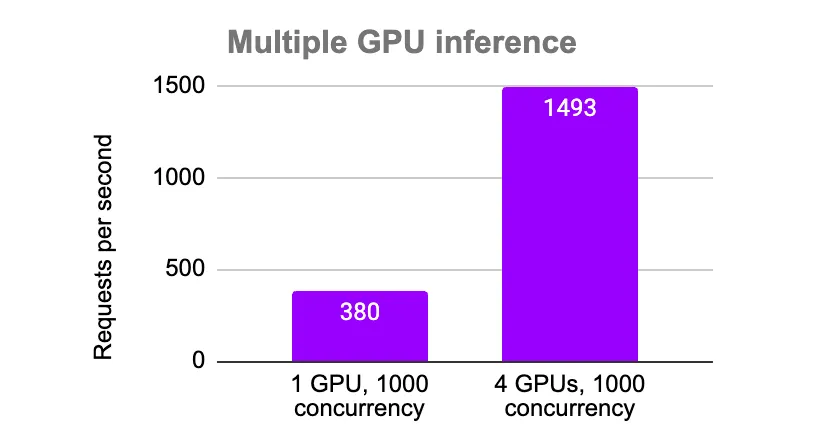
LitServe scales to 4 GPUs to achieve a throughput of 1493 RPS with batch size 10 and 2 workers per device.
The table below shows the effects of batch size and the number of concurrent requests on throughput (RPS) and the average latency per request with a single worker:
| Max batch size | Concurrency | Num GPUs | Latency (ms) | RPS |
|---|---|---|---|---|
| 2 | 32 | 1 | 8.6 | 121.7 |
| 2 | 100 | 1 | 7.07 | 126.7 |
| 8 | 100 | 1 | 2.8 | 342.6 |
| 10 | 100 | 1 | 2.6 | 384.5 |
| 8 | 100 | 4 | 1.2 | 823.6 |
| 8 | 200 | 4 | 0.96 | 1041.7 |
| 16 | 100 | 1 | 2.8 | 350.7 |
| 32 | 100 | 1 | 2.8 | 344.7 |
| 32 | 100 | 4 | 2.1 | 520.9 |
LitServe provides optimal latency and throughput with a batch size of 10 on a single GPU. It further scales up with 4 GPUs to achieve a throughput of 1041.7 RPS with a maximum batch size of 8 and 200 concurrent requests.
You can scale the server beyond this benchmark by scaling the number of GPUs, upgrading to a faster GPU and tuning the batch size.
Image classification
Image classification is used in computer vision to predict the class or label of an image. We use ResNet-152, a convolutional neural network pretrained on the imagenet dataset of 1000 classes.
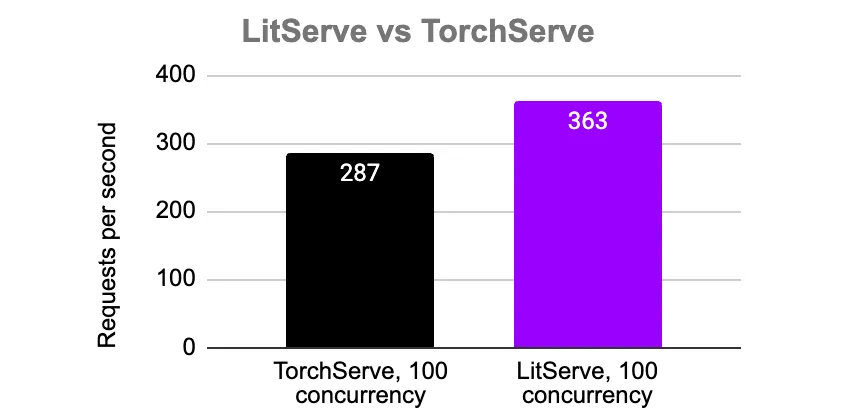
We compared LitServe and TorchServe with the same configuration. Both LitServe and TorchServe achieve similar throughput for the image classification task, with LitServe having 26.57% higher throughput.
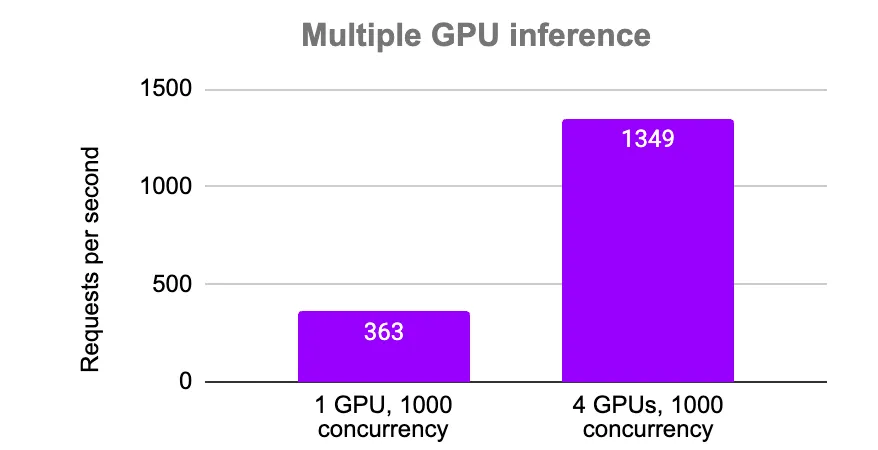
LitServe scales up to 4 GPUs to achieve a throughput of 1349.3 RPS with a batch size of 8, 4 worker per device, and a 0.01-second timeout.
The table below shows the effects of batch size and the number of concurrent requests on throughput (RPS) and the average latency per request:
| Max batch size | Concurrency | Num GPUs | Latency (ms) | RPS |
|---|---|---|---|---|
| 2 | 32 | 1 | 17.8 | 71.3 |
| 2 | 100 | 1 | 12.7 | 77.8 |
| 8 | 100 | 1 | 4.8 | 203.4 |
| 8 | 100 | 4 | 2.4 | 459.0 |
| 16 | 100 | 1 | 4.3 | 238.0 |
| 32 | 100 | 1 | 4.6 | 215.4 |
| 32 | 100 | 4 | 2.2 | 432.8 |
LitServe delivers optimal latency and throughput with a batch size of 16 on a single GPU with one worker. It can scale further by increasing the number of parallel workers or adding more GPUs. Increasing the number of GPUs to four results in 459 RPS.
You can scale the server beyond this benchmark by scaling the number of GPUs, upgrading to a faster GPU and tuning the batch size.
Large Language Models
Large Language Models (LLMs) are AI models that can generate high-quality text and interact with humans as chatbots. During inference, LLMs generate tokens (numerical representation of words), which are then decoded into human-readable words.
LitServe doesn't currently include LLM based optimizations such as quantization, continuous batching, or advanced KV cache strategies so the throughput is reported for a standard PyTorch based model. We will be adding optimizations to enhance LLM serving for high usage, making it fast and efficient soon.
In our experiments, we use LitGPT, a library designed for pre-training, fine-tuning, and running inference on large language models (LLMs). LitGPT runs Llama 3 8B with approximately 15 tokens per second.
LitServe serves Llama 3 8B with a throughput of ~15 tokens per second for a single request on a L4 GPU.
| Metric | Result |
|---|---|
| Time to first token (TTFT) (s) | 0.18 |
| Time per output token (TPOT) (s) | 0.07 |
| Throughput (tokens/s) | 15 |
| Throughput (tokens/s) (without LitServe, only LitGPT) | 15.05 |
LitServe scales LLM serving across multiple GPUs to achieve faster response times for concurrent requests. LLMs can be scaled to reduce the time needed to generate complete responses for concurrent requests.
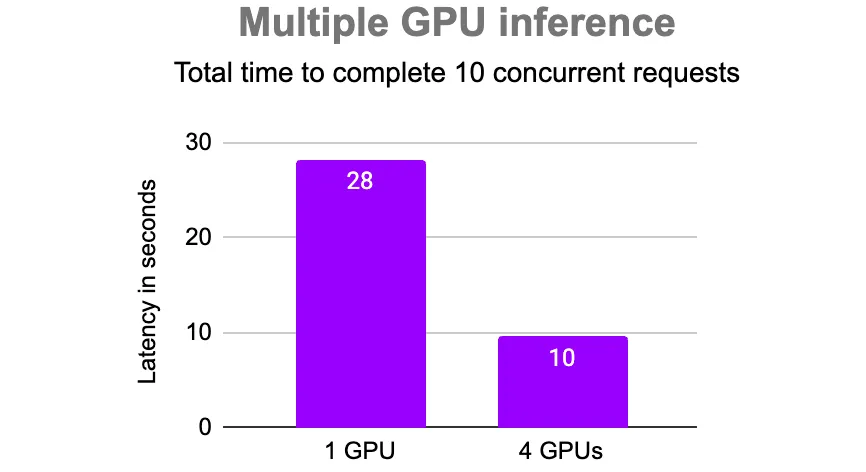
Batch size vs workers
LitServe allows serving a model via multiple parallel worker processes, with each worker serving a replica of the same model. This can be useful in scenarios where GPU utilization is low with a single worker. We tuned the batch size and number of workers to maximize throughput.
We ran experiments to find the optimal configuration for the number of workers per device and batch size for serving the BERT Large model. Increasing the number of workers led to slightly higher throughput. In our experiments, 2 workers and a maximum batch size of 16 performed best.
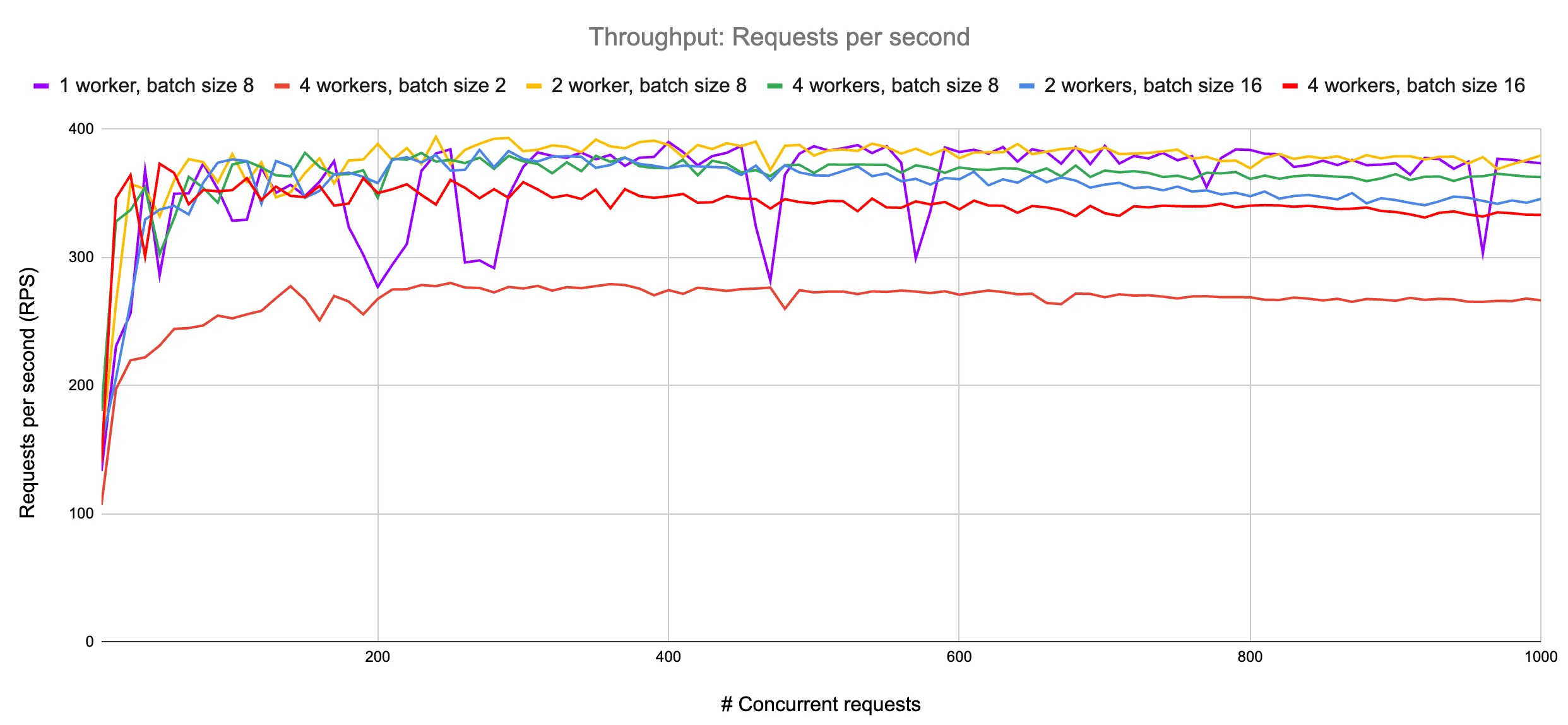
In the above plot for the BERT Large model, we observe an average 9.4% increase in throughput when the number of workers is increased from 1 to 4. We observe an even higher throughput gain in the case of serving the ResNet-152 model, with a 86.5% increase in throughput when the number of workers is increased from 1 to 8. ResNet-152 with a single worker utilized less than 50% of the GPU, while with 4 workers it utilized over 80% of the GPU, indicating reduced bottlenecks and less idle time.
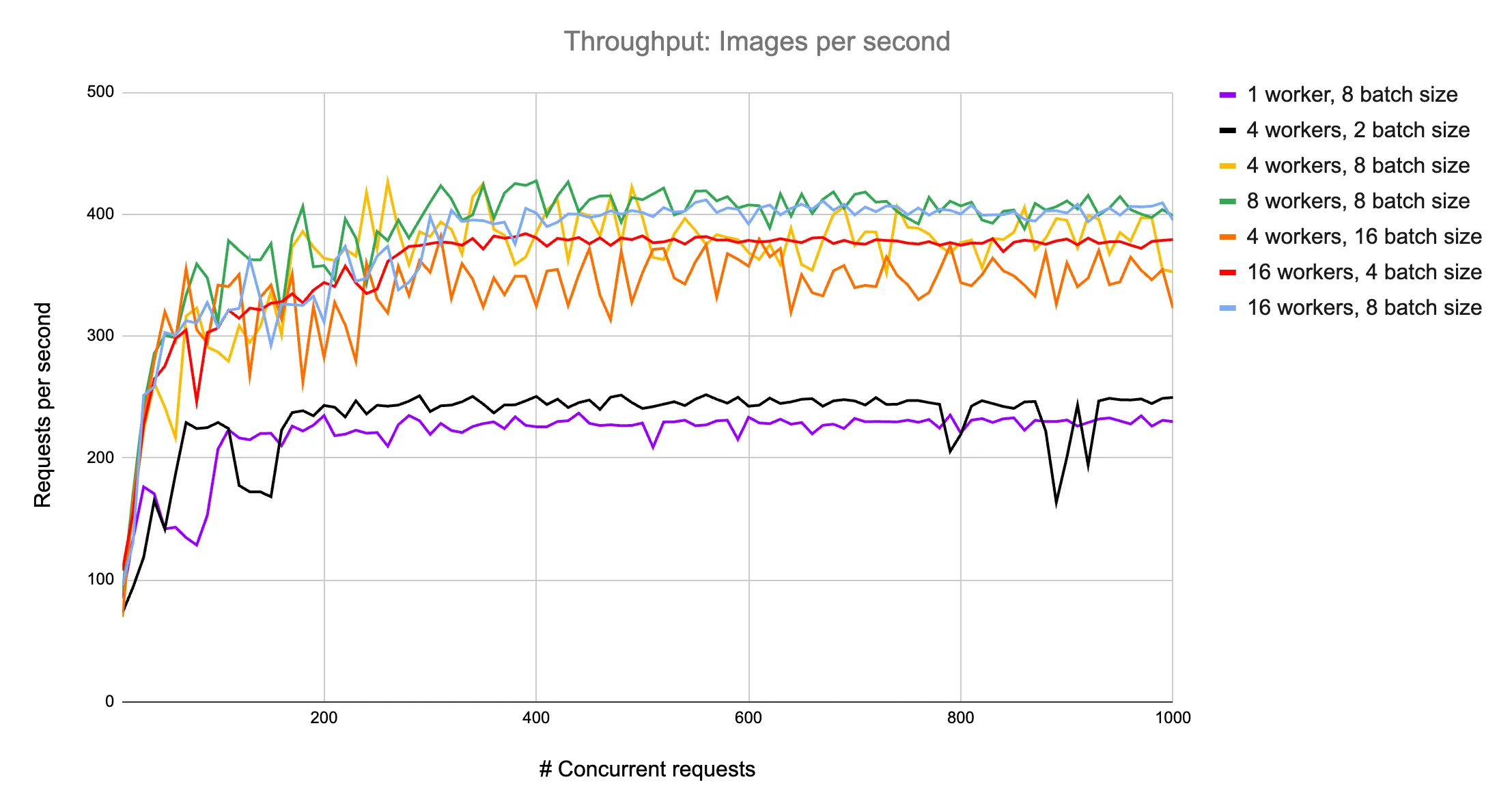
Note that the above-tuned configuration would be different for different models and GPU types, so users are advised to perform performance tuning based on their specific use case.
Variable precision
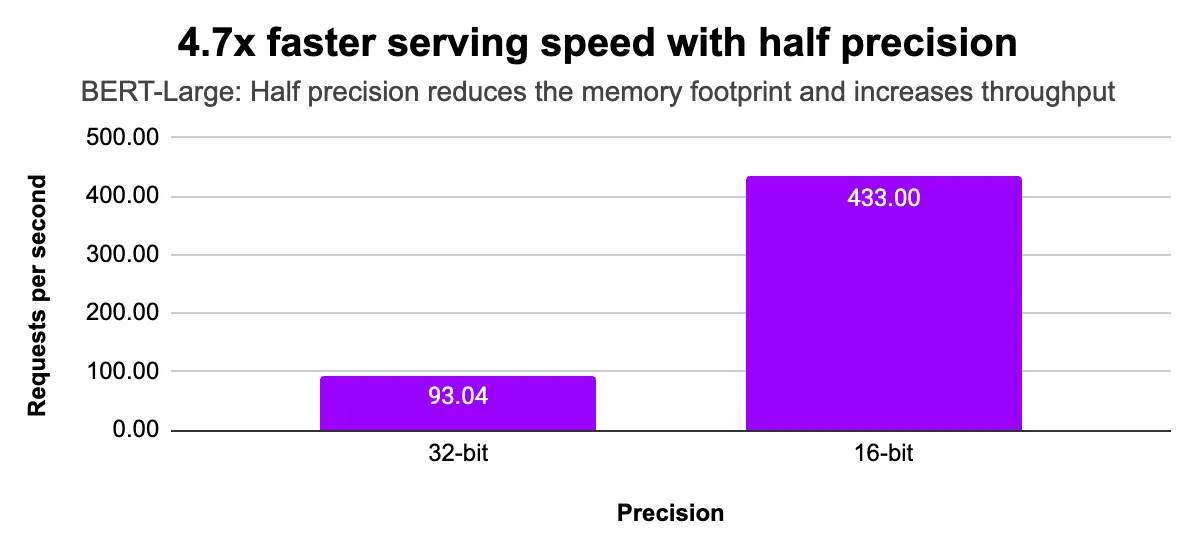
Model optimizations, such as using lower precision for faster computation and more efficient GPU memory utilization, can be applied when deploying models with LitServe.
The following chart shows the impact of serving a BERT-Large model with half precision, resulting in a 4.7x increase in inference speed on a single L4 GPU.
import torch
from transformers import AutoModelForSequenceClassification, AutoTokenizer
import litserve as ls

class HuggingFaceLitAPI(ls.LitAPI):
    def setup(self, device):
        self.precision = torch.float32  # replace it with torch.bfloat16
        model_name = "google-bert/bert-large-uncased"
        self.tokenizer = AutoTokenizer.from_pretrained(model_name)
        self.model = AutoModelForSequenceClassification.from_pretrained(model_name, torch_dtype=self.precision).to(device)

    def decode_request(self, request:dict):
        return request["text"]

    def batch(self, inputs):
        return self.tokenizer(inputs, return_tensors="pt", padding=True, truncation=True)

    def predict(self, inputs):
        inputs = {key: value.to(self.device) for key, value in inputs.items()}
        with torch.inference_mode():
            outputs = self.model(**inputs)
            logits = outputs.logits
            predicted_class_ids = torch.argmax(logits, dim=1)
        return predicted_class_ids

    def unbatch(self, outputs):
        return outputs.tolist()

    def encode_response(self, output):
        return {"label_idx": output}

if __name__ == "__main__":
    api = HuggingFaceLitAPI(max_batch_size=10, batch_timeout=0.01)
    server = ls.LitServer(api, workers_per_device=1)
    server.run(port=8000)
Was this page helpful?
Thanks for the feedback.