
Speed up serving by 200x
Before reading this guide, make sure you have deployed the hello world server.
This guide shows how to boost server inference speed from 11 -> 1432 requests per second 🤯 using LitServe features like batching and multi-GPU. You'll optimize on CPU, then a single GPU, and finally a multi-GPU setup, achieving a 230x throughput over a basic FastAPI server 🤯.
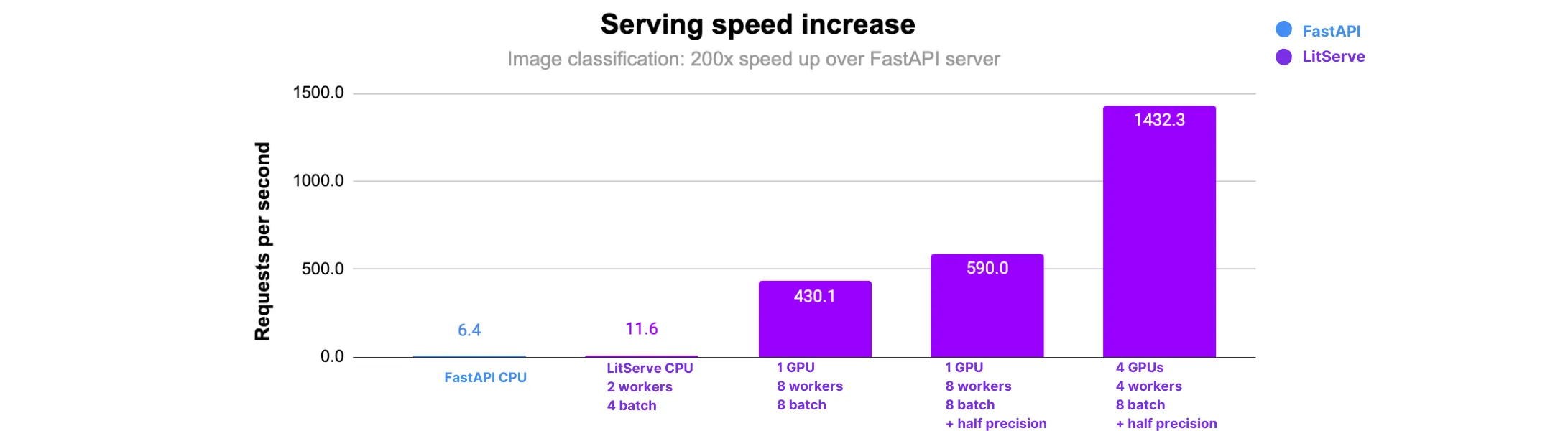
Baseline server
The baseline server without any optimizations is an image classification server using a pretrained ResNet-152 model. The server takes an image input and returns the predicted class as response.
A baseline server is equivalent to a FastAPI server without any ML optimizations.
import torch, torchvision, PIL, io, base64
import litserve as ls

class ImageClassifierAPI(ls.LitAPI):
    def setup(self, device):
        weights = torchvision.models.ResNet152_Weights.DEFAULT
        self.image_processing = weights.transforms()
        self.model = torchvision.models.resnet152(weights=weights).eval().to(device)

    def decode_request(self, request):
        image_data = request["image_data"]
        image = base64.b64decode(image_data)
        pil_image = PIL.Image.open(io.BytesIO(image)).convert("RGB")
        processed_image = self.image_processing(pil_image)
        return processed_image.unsqueeze(0).to(self.device)

    def predict(self, x):
        with torch.inference_mode():
            outputs = self.model(x)
            _, predictions = torch.max(outputs, 1)
            prediction = predictions.tolist()
        return prediction[0]

    def encode_response(self, output):
        return {"output": output}

if __name__ == "__main__":
    api = ImageClassifierAPI()
    server = ls.LitServer(api)
    server.run(port=8000)
CPU-only server
In this section we apply the following optimizations to get to the best performing server on a CPU-only machine: increase batch size, and increase parallel workers.
Theoretical
We measure the time required to process a batch of 16 images (224x224) using ResNet-152 on a CPU without LitServe. From this, we calculate the number of images processed per second as the theoretical maximum throughput.
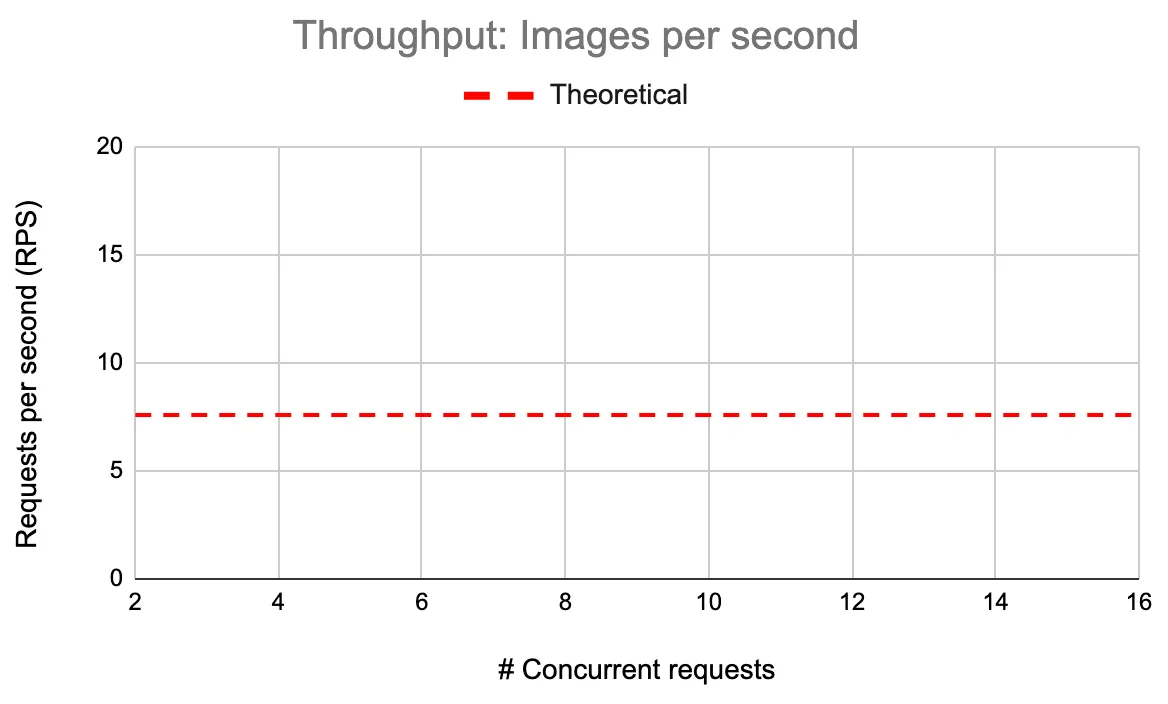
We achieve a throughput of 7.5 with a batch size of 16, which we use as a theoretical throughput. In the following section, we will demonstrate that with LitServe, we can exceed this theoretical maximum throughput.
Here is the code to calculate the theoretical throughput.
import torch, torchvision, time

weights = torchvision.models.ResNet152_Weights.DEFAULT
image_processing = weights.transforms()
model = torchvision.models.resnet152(weights=weights).eval()

def calculate_throughput(x):
    t0 = time.perf_counter()
    y = model(x)
    if torch.cuda.is_available():
        torch.cuda.synchronize()
    t1 = time.perf_counter()

    throughput = n/(t1-t0)
    total_time = (t1-t0)*1000
    return throughput, total_time

n = 16
x = torch.randn(n, 3, 224, 224)
throughput, total_time = calculate_throughput(x)
print(f"time taken: {total_time:.3f}")
print(f"Average throughput: {throughput:.3f} reqs/sec")
Baseline
We start with the default LitServe configuration to establish a performance baseline. This will help us measure the impact of subsequent optimizations.
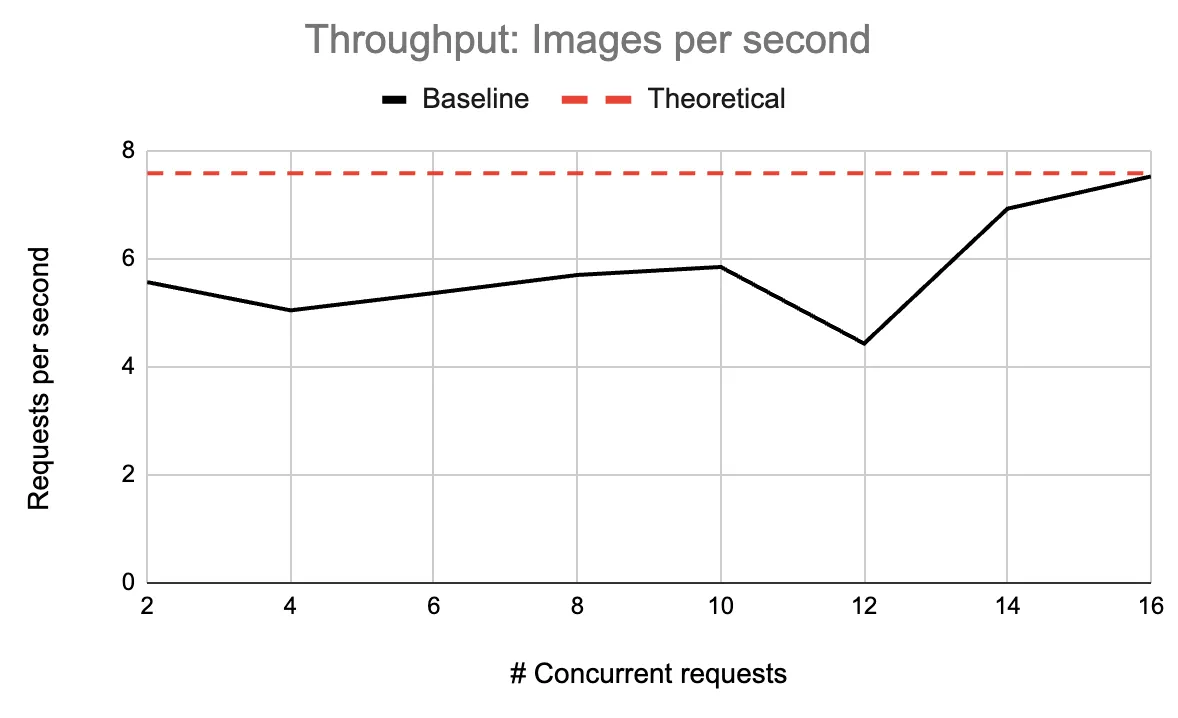
Below, we plot a chart of throughput against various concurrent requests, and we approach the theoretical limit with a throughput of 7.5 RPS.
import torch, torchvision, PIL, io, base64
import litserve as ls

class ImageClassifierAPI(ls.LitAPI):
    def setup(self, device):
        weights = torchvision.models.ResNet152_Weights.DEFAULT
        self.image_processing = weights.transforms()
        self.model = torchvision.models.resnet152(weights=weights).eval().to(device)

    def decode_request(self, request):
        image_data = request["image_data"]
        image = base64.b64decode(image_data)
        pil_image = PIL.Image.open(io.BytesIO(image)).convert("RGB")
        processed_image = self.image_processing(pil_image)
        return processed_image.unsqueeze(0).to(self.device)

    def predict(self, x):
        with torch.inference_mode():
            outputs = self.model(x)
            _, predictions = torch.max(outputs, 1)
            prediction = predictions.tolist()
        return prediction[0]

    def encode_response(self, output):
        return {"output": output}

if __name__ == "__main__":
    api = ImageClassifierAPI()
    server = ls.LitServer(api, accelerator="cpu")
    server.run(port=8000)
Increase batch size
We achieve a throughput of 9 RPS with a maximum batch size of 8. We test batch sizes from 2 to 16 and observe gains in throughput.
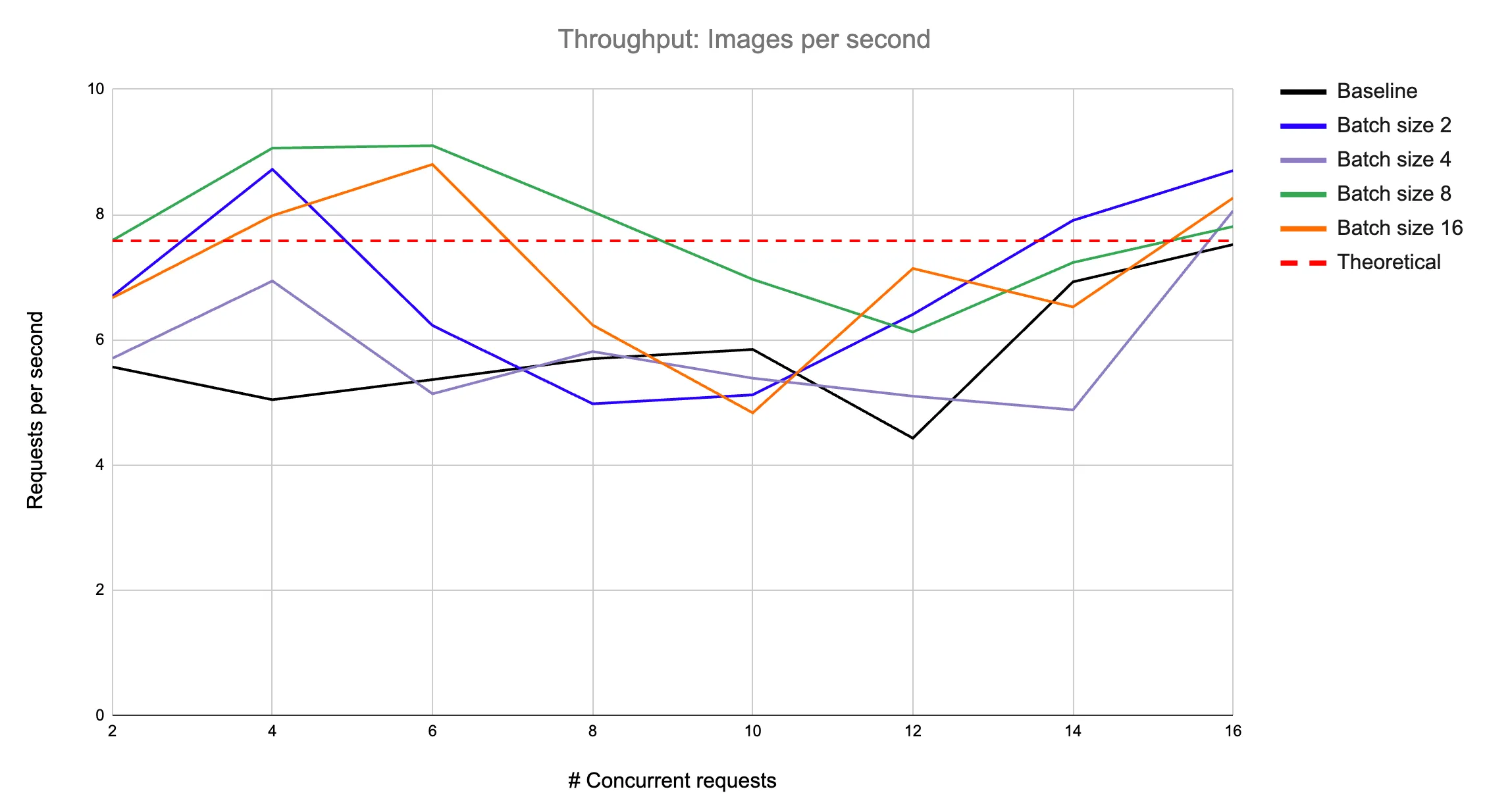
To enable batching, we modify the baseline server code as follows: we increase the batch size by setting the max_batch_size argument in the LitServer class and implement the batch and unbatch methods in LitAPI.
import torch, torchvision, PIL, io, base64
import litserve as ls

class ImageClassifierAPI(ls.LitAPI):
    def setup(self, device):
        weights = torchvision.models.ResNet152_Weights.DEFAULT
        self.image_processing = weights.transforms()
        self.model = torchvision.models.resnet152(weights=weights).eval().to(device)

    def decode_request(self, request):
        image_data = request["image_data"]
        return image_data

    def batch(self, inputs):
        batched_inputs = []
        for image_data in inputs:
            image = base64.b64decode(image_data)
            pil_image = PIL.Image.open(io.BytesIO(image)).convert("RGB")
            processed_image = self.image_processing(pil_image)
            batched_inputs.append(processed_image)
        return torch.stack(batched_inputs).to(self.device)

    def predict(self, x):
        with torch.inference_mode():
            outputs = self.model(x)
            _, predictions = torch.max(outputs, 1)
        return predictions

    def unbatch(self, output):
        return output.tolist()

    def encode_response(self, output):
        return {"output": output}

if __name__ == "__main__":
    api = ImageClassifierAPI(max_batch_size=2, batch_timeout=0.01)
    server = ls.LitServer(api, accelerator="cpu")
    server.run(port=8000)
Increase workers
We tune workers_per_device which creates parallel workers serving the same replica of the model. The following chart shows throughput gains for different worker and batch size configurations.
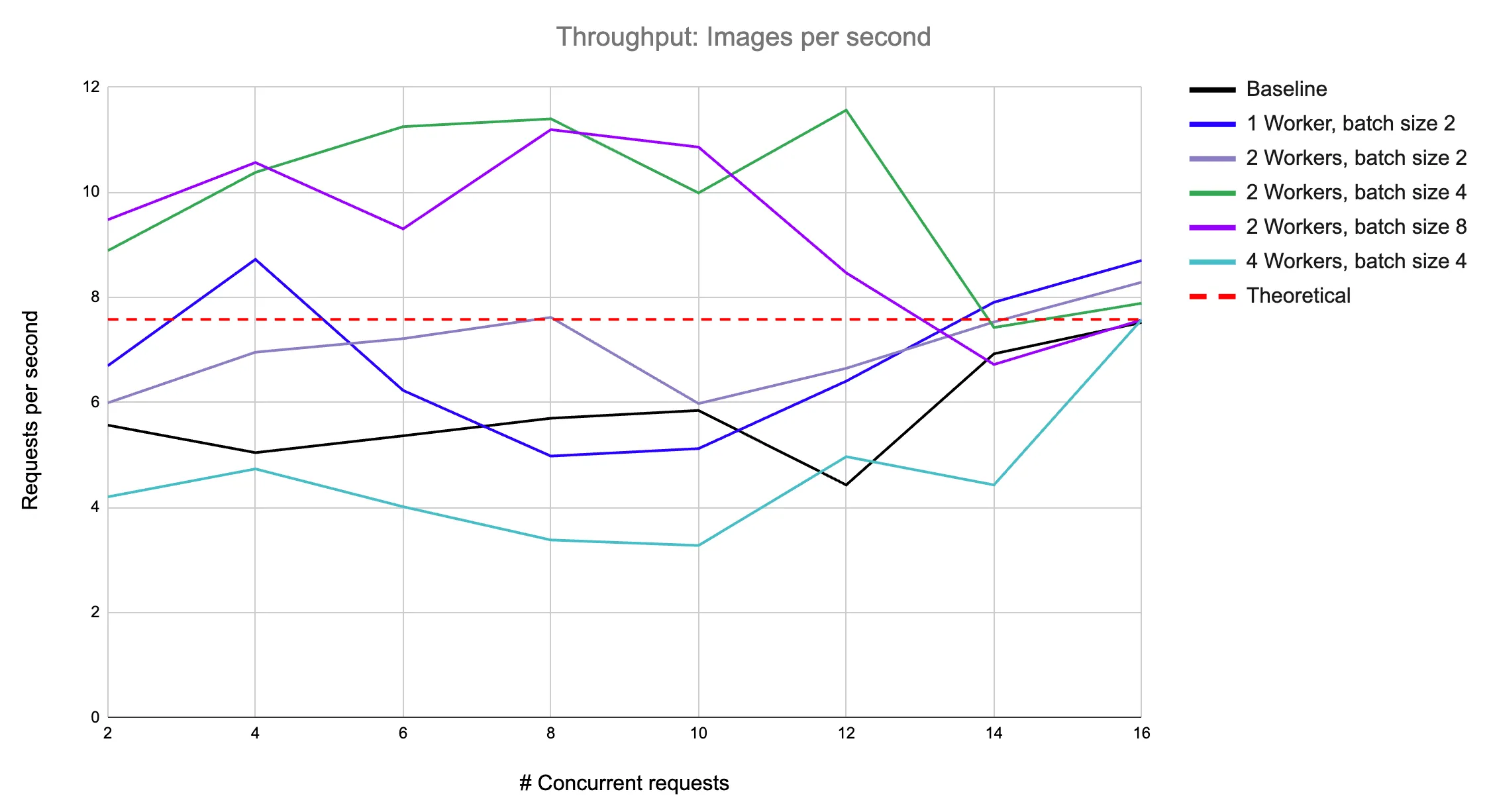
We increased the average throughput of the baseline server and exceeded the theoretical throughput. This server can be further optimized by horizontally scaling the CPU machines to serve the models and placing a load balancer in front.
GPU server
GPU machines enable faster processing of data with their massive parallel computation ability. In our experiments, we use Nvidia L4 GPU. We will take our unoptimized baseline server, run it on a GPU, and optimize it to maximize throughput.
Baseline
Start with the default configuration of a single batch size and a single worker to establish a performance baseline for the GPU. Following is the code for the baseline model served on a single GPU:
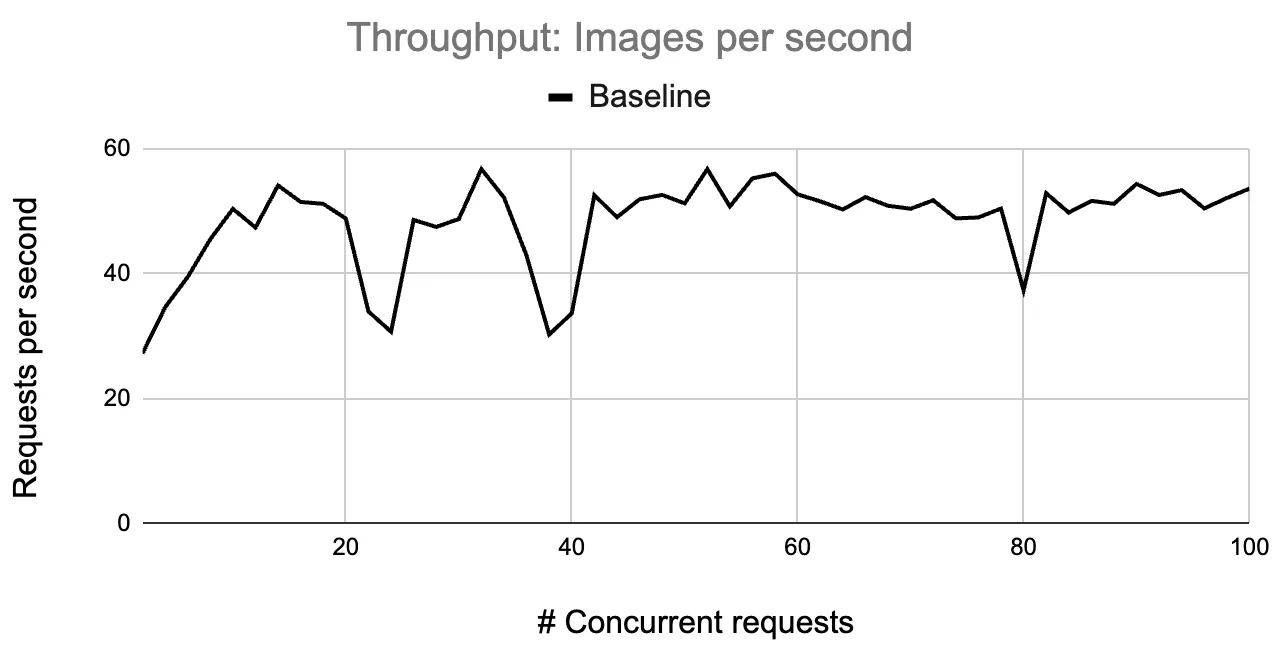
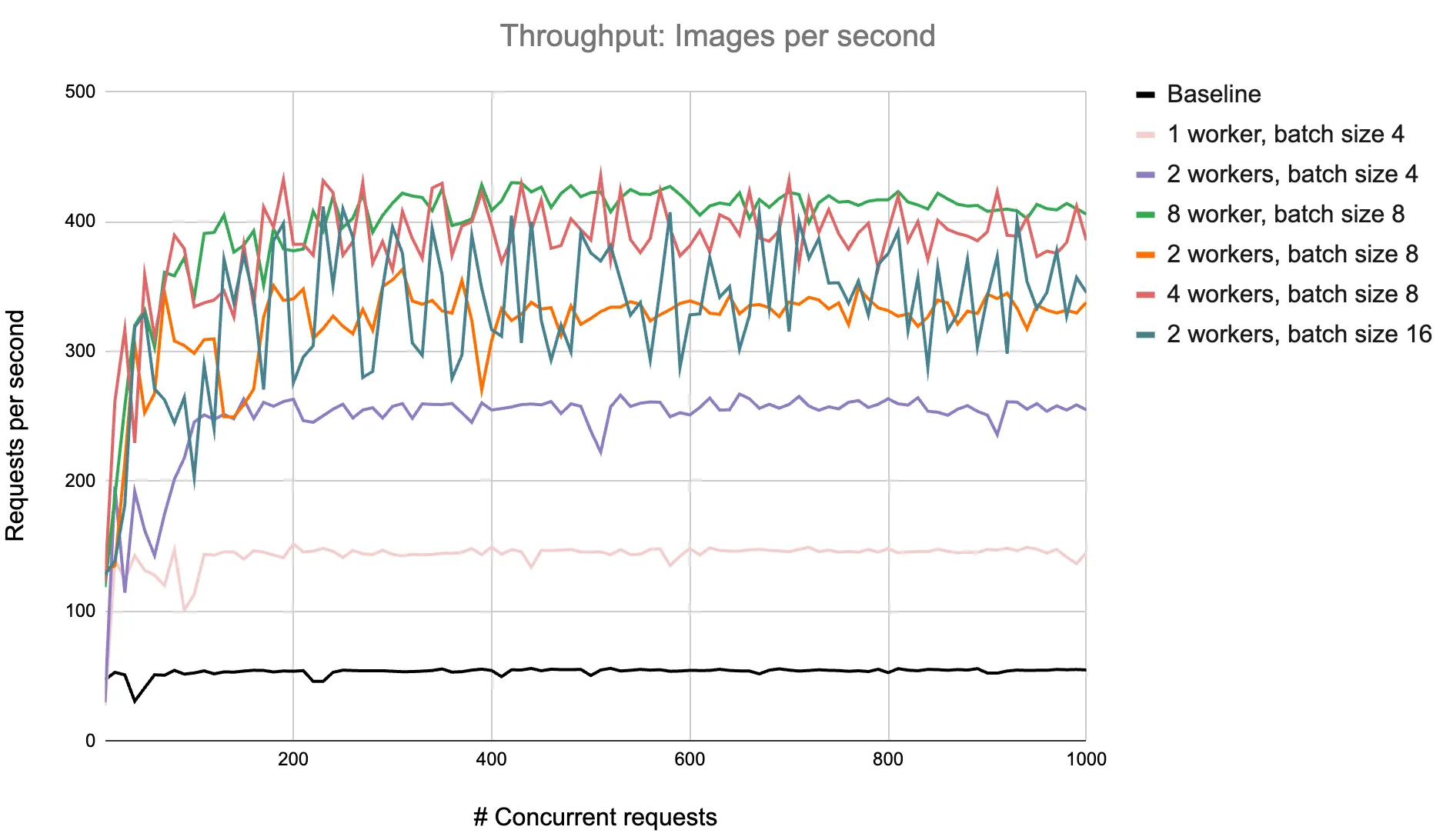
We observe a maximum throughput of 57 RPS. Below, we plot a chart of throughput against various concurrent requests.
import torch, torchvision, PIL, io, base64
import litserve as ls

class ImageClassifierAPI(ls.LitAPI):
    def setup(self, device):
        weights = torchvision.models.ResNet152_Weights.DEFAULT
        self.image_processing = weights.transforms()
        self.model = torchvision.models.resnet152(weights=weights).eval().to(device)

    def decode_request(self, request):
        image_data = request["image_data"]
        image = base64.b64decode(image_data)
        pil_image = PIL.Image.open(io.BytesIO(image)).convert("RGB")
        processed_image = self.image_processing(pil_image)
        return processed_image.unsqueeze(0).to(self.device)

    def predict(self, x):
        with torch.inference_mode():
            outputs = self.model(x)
            _, predictions = torch.max(outputs, 1)
            prediction = predictions.tolist()
        return prediction[0]

    def encode_response(self, output):
        return {"output": output}

if __name__ == "__main__":
    api = ImageClassifierAPI()
    server = ls.LitServer(api, accelerator="gpu")
    server.run(port=8000)
Decode requests in parallel
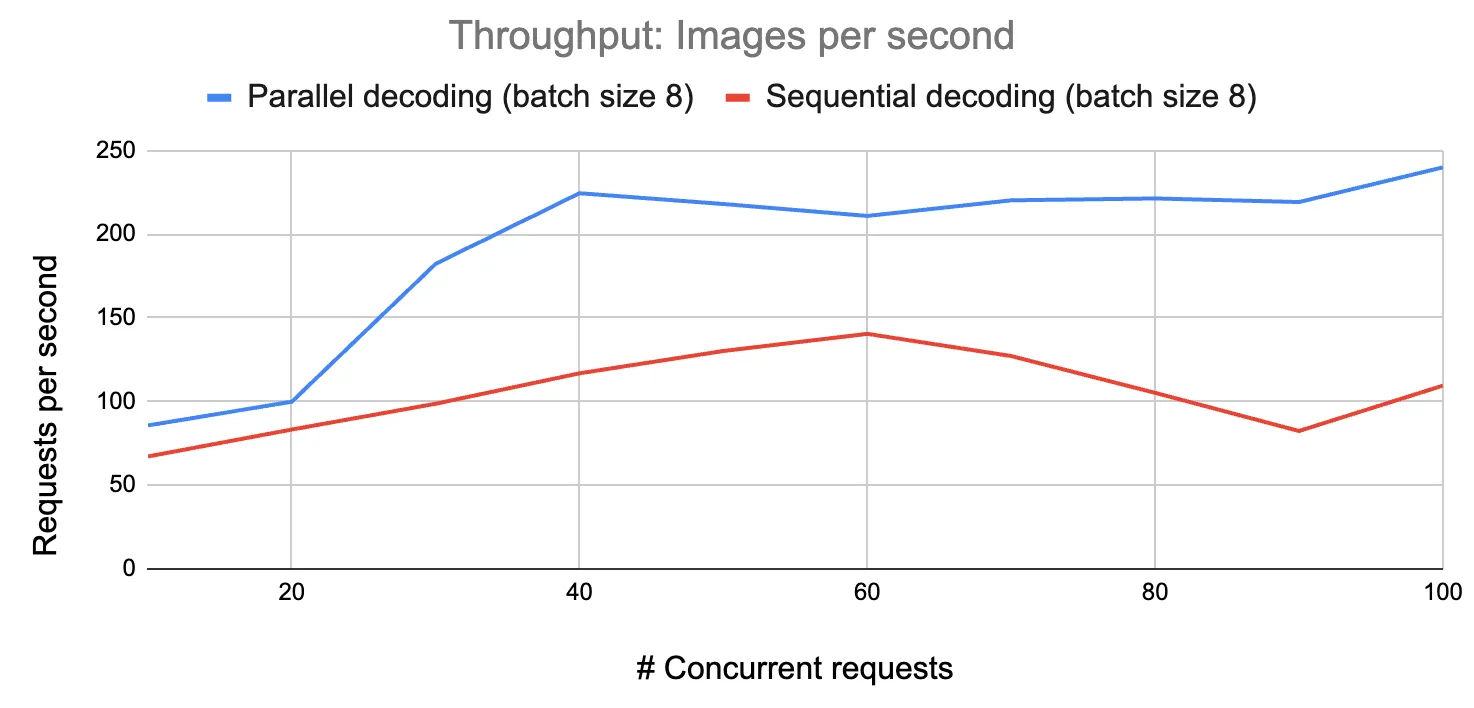
With dynamic batching, we decode the requests and load the images sequentially. Sequential image loading introduces a bottleneck, causing the server to spend more time loading images while GPUs remain idle. We parallelize this step by adding a thread pool, making efficient use of the GPU resources and increasing throughput by 71%.
import torch, torchvision, PIL, io, base64, os
from concurrent.futures import ThreadPoolExecutor
import litserve as ls

class ImageClassifierAPI(ls.LitAPI):
    def setup(self, device):
        weights = torchvision.models.ResNet152_Weights.DEFAULT
        self.image_processing = weights.transforms()
        self.model = torchvision.models.resnet152(weights=weights).eval().to(device)

    def decode_request(self, request):
        image_data = request["image_data"]
        return image_data

    def batch(self, inputs):
        def process_batch(image_data):
            image = base64.b64decode(image_data)
            pil_image = PIL.Image.open(io.BytesIO(image)).convert("RGB")
            return self.image_processing(pil_image)

        with ThreadPoolExecutor(max(len(inputs), os.cpu_count())) as pool:
            batched_inputs = list(pool.map(process_batch, inputs))
        return torch.stack(batched_inputs).to(self.device)

    def predict(self, x):
        with torch.inference_mode():
            outputs = self.model(x)
            _, predictions = torch.max(outputs, 1)
        return predictions

    def unbatch(self, output):
        return output.tolist()

    def encode_response(self, output):
        return {"output": output}

if __name__ == "__main__":
    api = ImageClassifierAPI(max_batch_size=8, batch_timeout=0.01)
    server = ls.LitServer(api, accelerator="gpu", workers_per_device=1)
    server.run(port=8000, num_api_servers=4)
Increase batch size
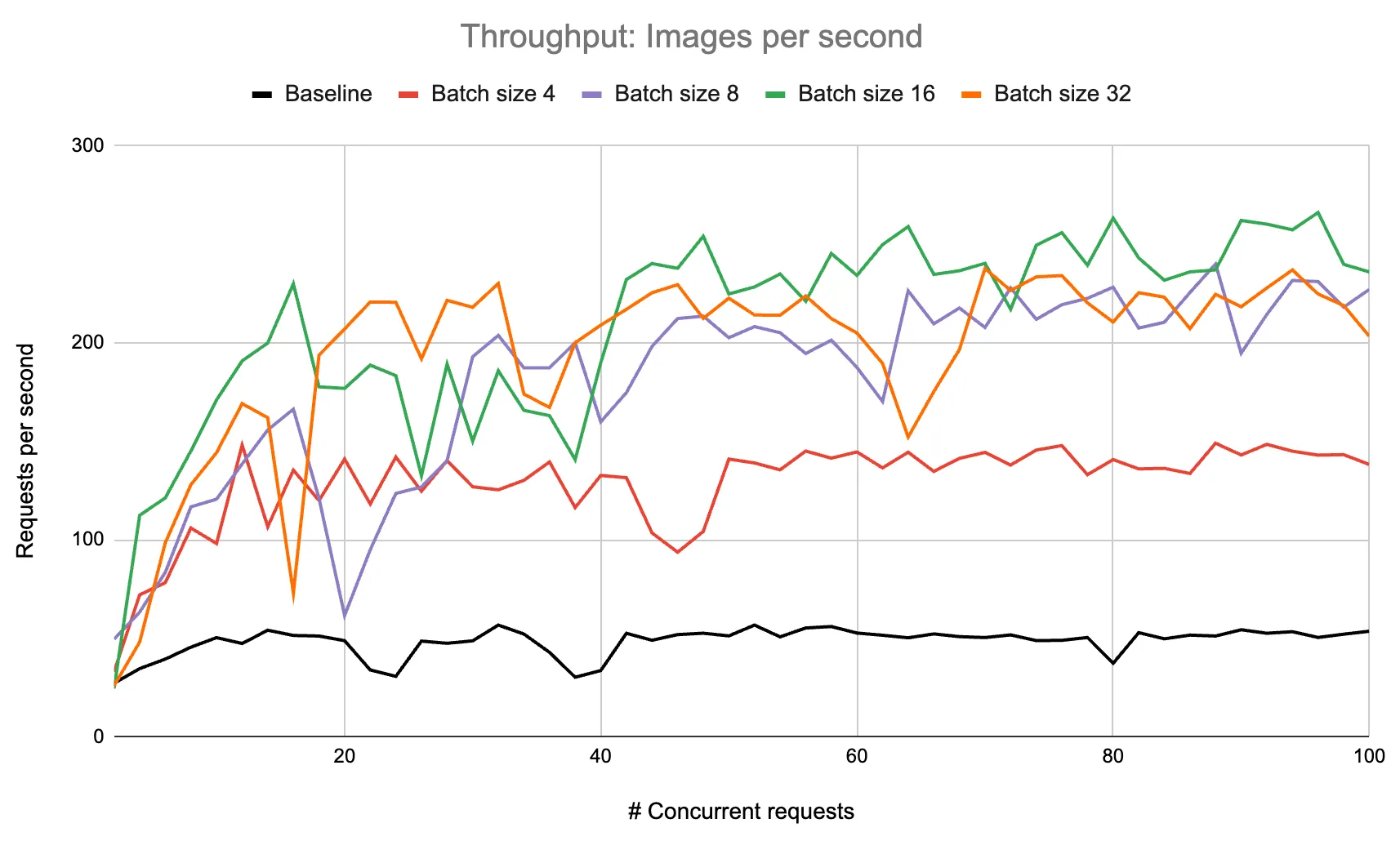
We achieve a maximum throughput of 266 RPS with a batch size of 16. Testing batch sizes from 4 to 32, we find that throughput plateaus around a batch size of 32.
Increase workers
We further scale the throughput to 430 RPS with 8 workers and a batch size of 8. The following chart shows throughput gains for different worker and batch size configurations.
Variable precision
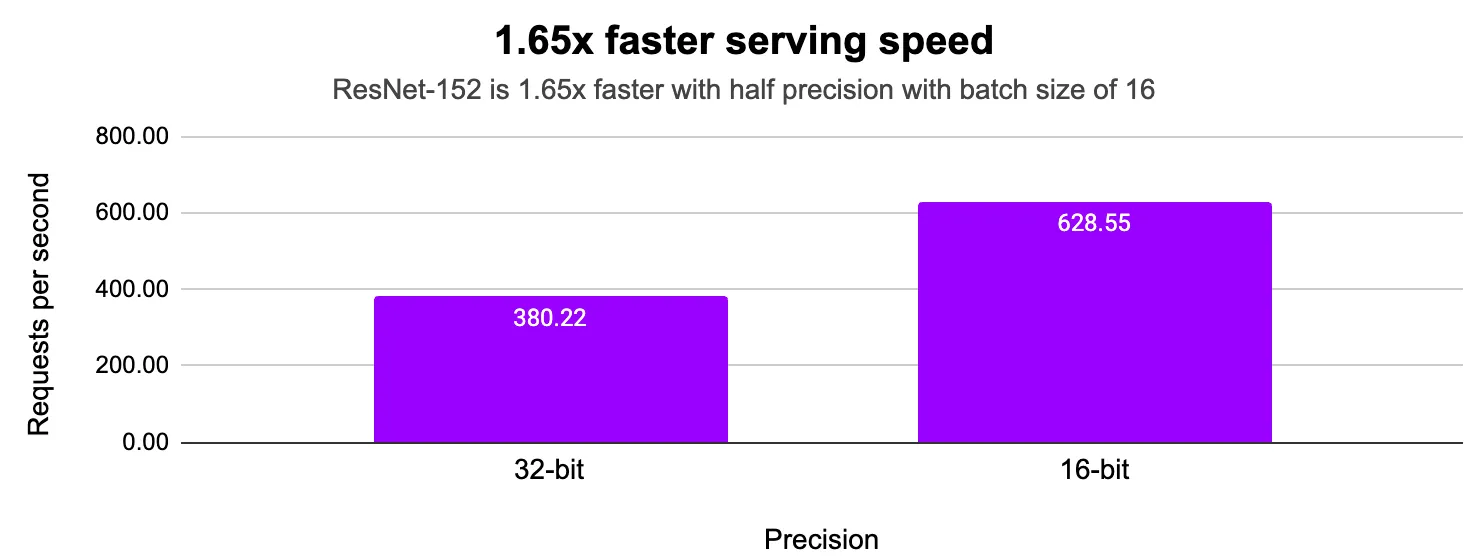
Low precision model inference uses fewer bits for calculations, making models faster and more memory efficient. With 16-bit precision, memory use is cut in half, and computation speed increases. This allows for larger batch sizes, increasing overall throughput. Learn more about different precision types and their impact here.
import torch, torchvision, PIL, io, base64, os
from concurrent.futures import ThreadPoolExecutor
import litserve as ls

precision = torch.bfloat16

class ImageClassifierAPI(ls.LitAPI):
    def setup(self, device):
        weights = torchvision.models.ResNet152_Weights.DEFAULT
        self.image_processing = weights.transforms()
        self.model = torchvision.models.resnet152(weights=weights).eval().to(device).to(precision)
        self.pool = ThreadPoolExecutor(os.cpu_count())

    def decode_request(self, request):
        image_data = request["image_data"]
        return image_data

    def batch(self, inputs):
        print(len(inputs))
        def process_batch(image_data):
            image = base64.b64decode(image_data)
            pil_image = PIL.Image.open(io.BytesIO(image)).convert("RGB")
            return self.image_processing(pil_image)

        batched_inputs = list(self.pool.map(process_batch, inputs))
        return torch.stack(batched_inputs).to(self.device).to(precision)

    def predict(self, x):
        with torch.inference_mode():
            outputs = self.model(x)
            _, predictions = torch.max(outputs, 1)
        return predictions

    def unbatch(self, output):
        return output.tolist()

    def encode_response(self, output):
        return {"output": output}

if __name__ == "__main__":
    api = ImageClassifierAPI(max_batch_size=16, batch_timeout=0.01)
    server = ls.LitServer(api, accelerator="gpu", devices=1, workers_per_device=8)
    server.run(port=8000, num_api_servers=4)
Multi-GPU server
LitServe scales to use multiple GPUs and serves replicas of the same model on each GPU. In the following experiments, we use 4xL4 GPUs, and LitServe will start a worker for each GPU.
Baseline
Run the baseline server with 4 GPUs to establish a performance baseline for a multi-GPU server.
import torch, torchvision, PIL, io, base64
import litserve as ls

class ImageClassifierAPI(ls.LitAPI):
    def setup(self, device):
        print(device)
        weights = torchvision.models.ResNet152_Weights.DEFAULT
        self.image_processing = weights.transforms()
        self.model = torchvision.models.resnet152(weights=weights).eval().to(device).to(torch.bfloat16)

    def decode_request(self, request):
        image_data = request["image_data"]
        image = base64.b64decode(image_data)
        pil_image = PIL.Image.open(io.BytesIO(image)).convert("RGB")
        processed_image = self.image_processing(pil_image)
        return processed_image.unsqueeze(0).to(self.device).to(torch.bfloat16)

    def predict(self, x):
        with torch.inference_mode():
            outputs = self.model(x)
            _, predictions = torch.max(outputs, 1)
            prediction = predictions.tolist()
        return prediction[0]

    def encode_response(self, output):
        return {"output": output}

if __name__ == "__main__":
    api = ImageClassifierAPI()
    server = ls.LitServer(api, accelerator="auto", devices=4)
    server.run(port=8000, num_api_servers=4)
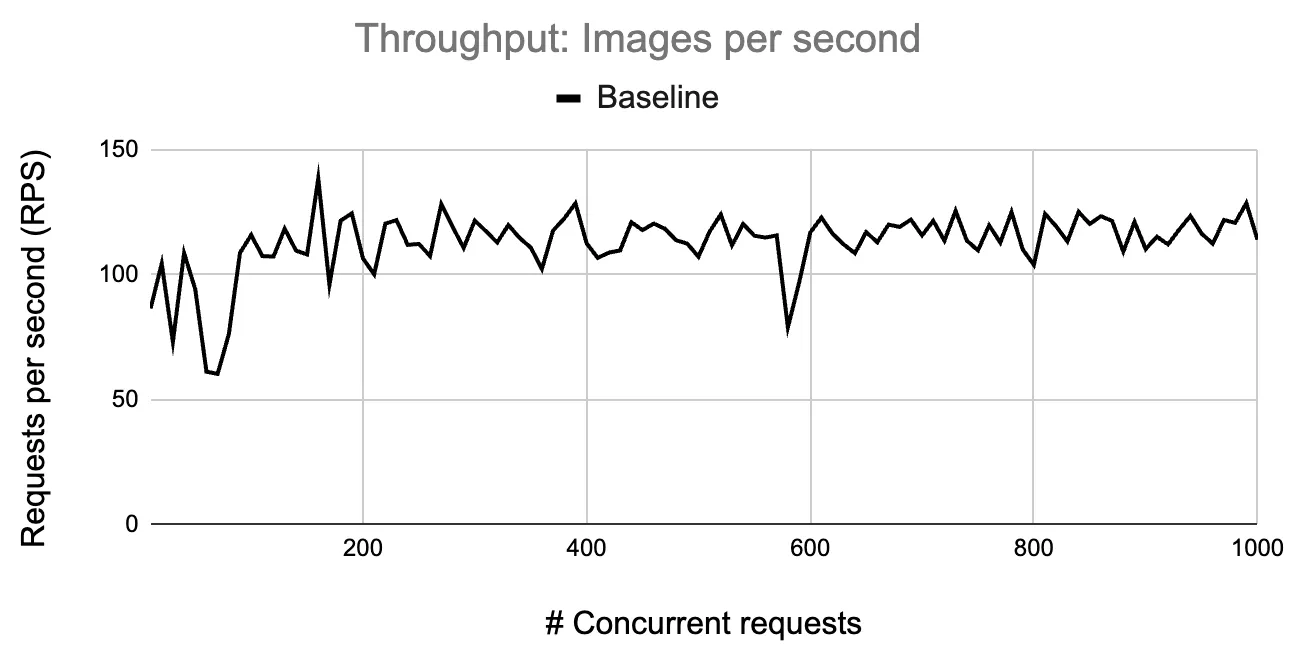
The multi-GPU baseline server achieves a throughput of 138 RPS. Below, we plot a chart of throughput against various concurrent requests.
Increase batch size
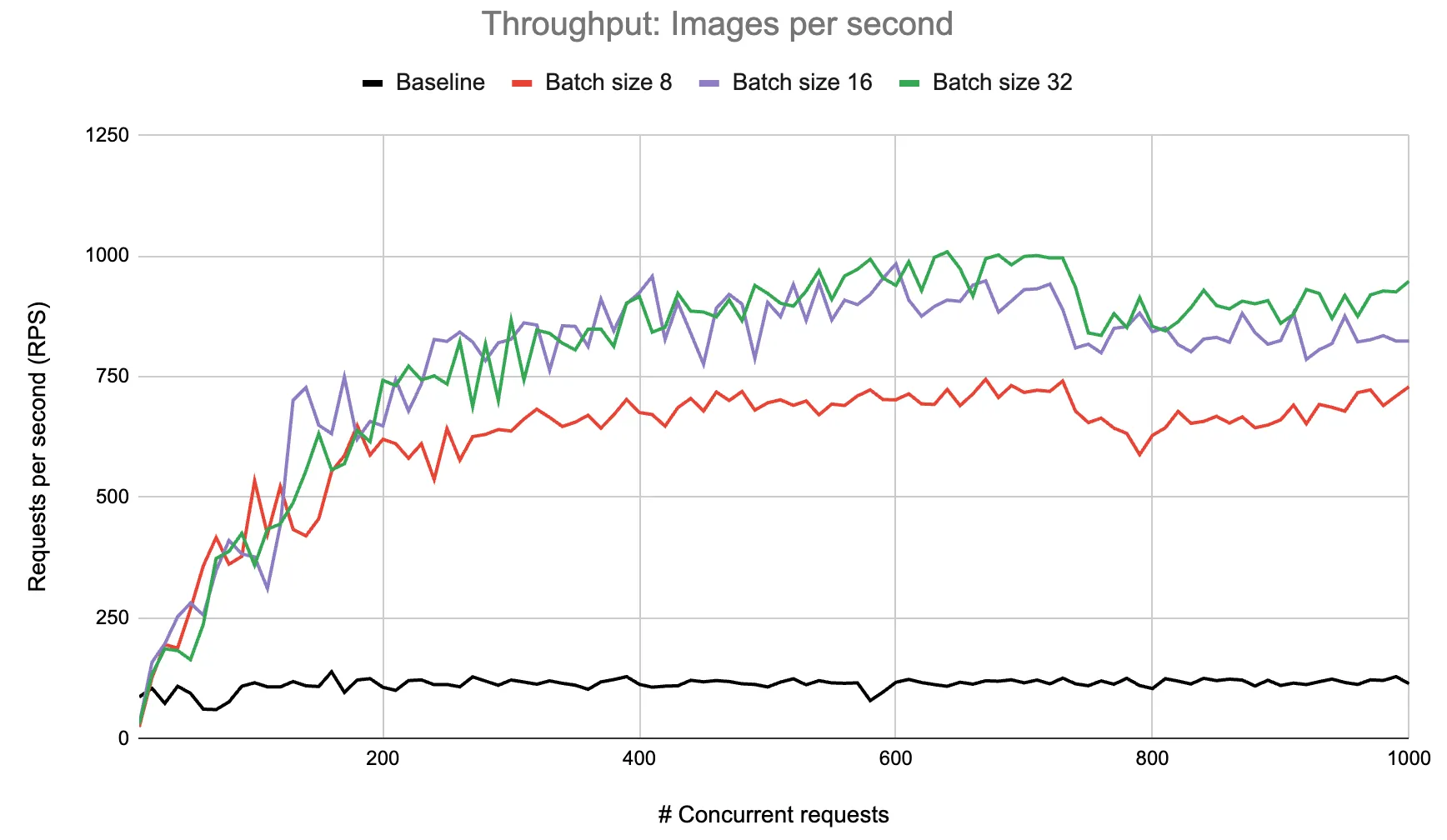
We achieve a maximum throughput of 1000 RPS with a batch size of 32. The chart below presents the change in throughput with various concurrent requests for different batch sizes.
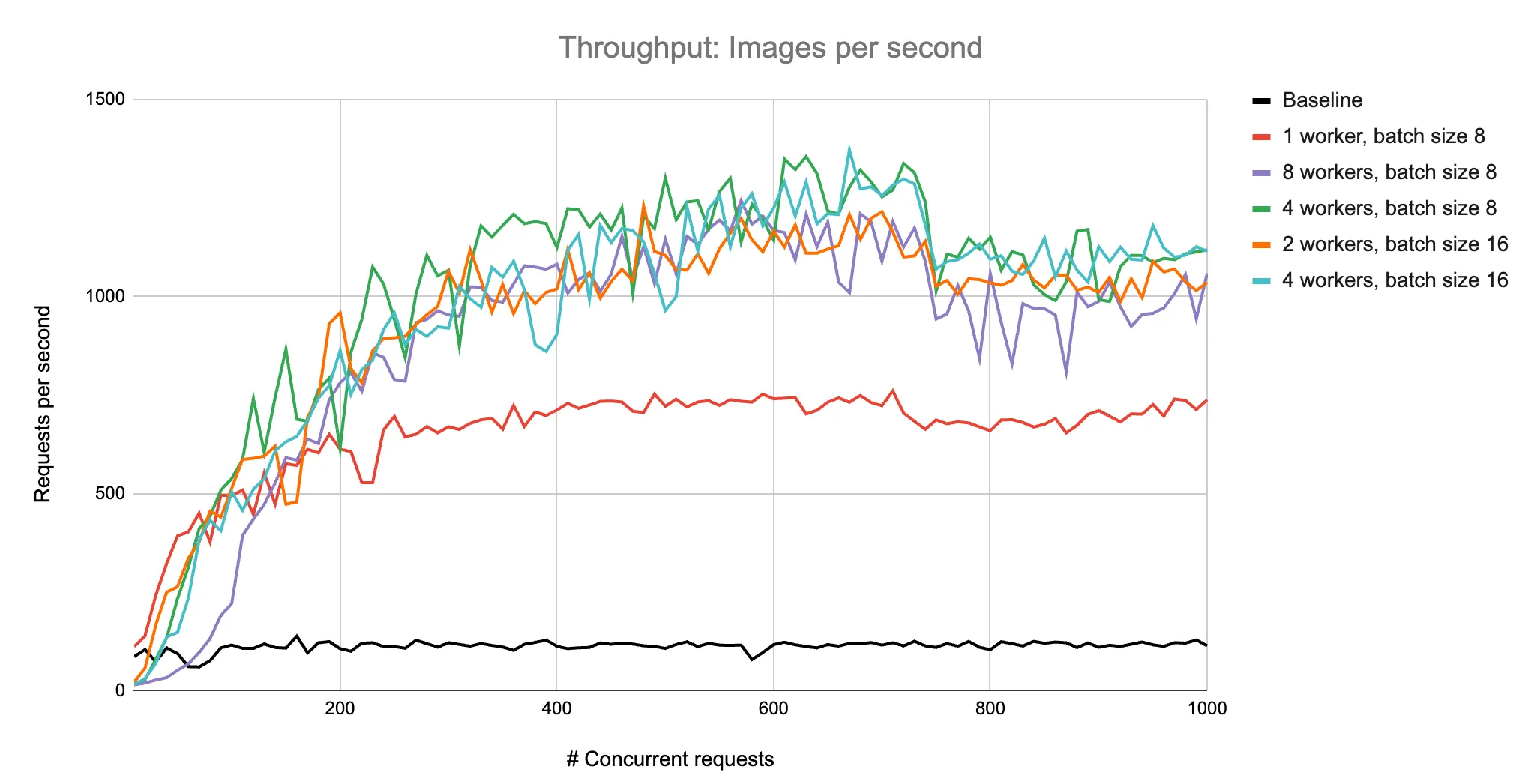
Increase workers
We further scale the throughput to 1355 RPS with 4 workers and a batch size of 8. The following chart shows throughput gains for different worker and batch size configurations.
Summary
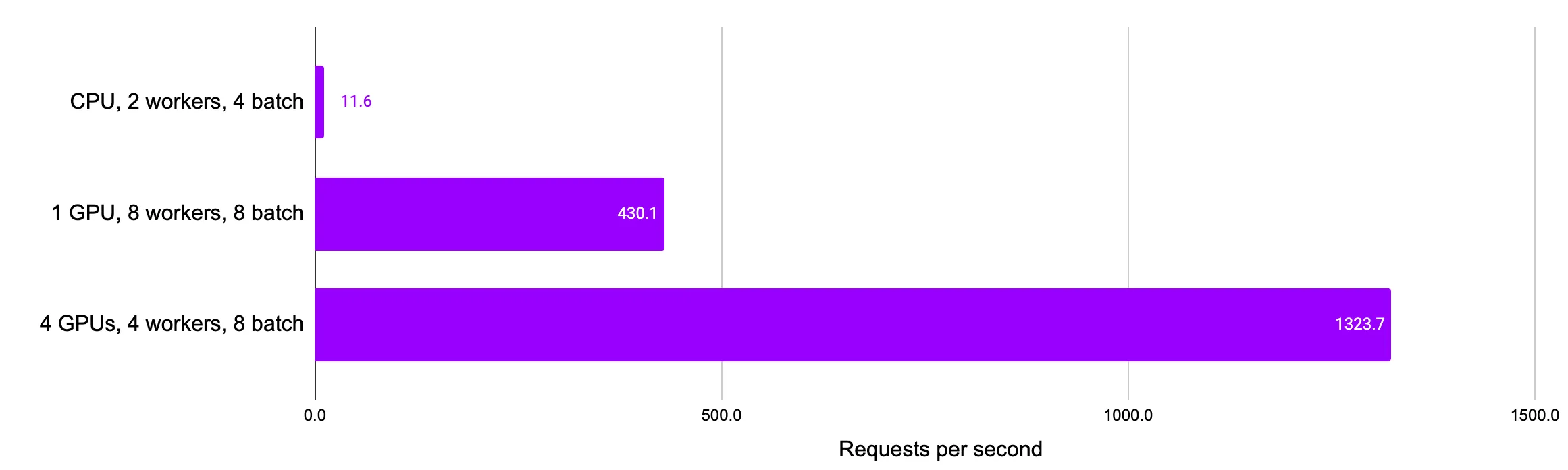
We saw a 114x increase in throughput from the CPU-only setup to the optimized multi-GPU server with dynamic batching and parallel request decoding. This can be further scaled by adding more GPUs or serving across machines.
Was this page helpful?
Thanks for the feedback.