
Request, response format
Request, response format
Inconsistent request and response handling can cause errors and slow development. LitServe uses Python type hints and Pydantic to validate and format data—ensuring reliable, well-structured APIs for any input type. This streamlines integration and reduces bugs.
Background
Type hints
Type hints in Python help specify what kind of data functions expect and return. This makes the code clearer and helps catch errors early. For example, if a function should receive an integer, type hints ensure we don't accidentally pass a word (string).
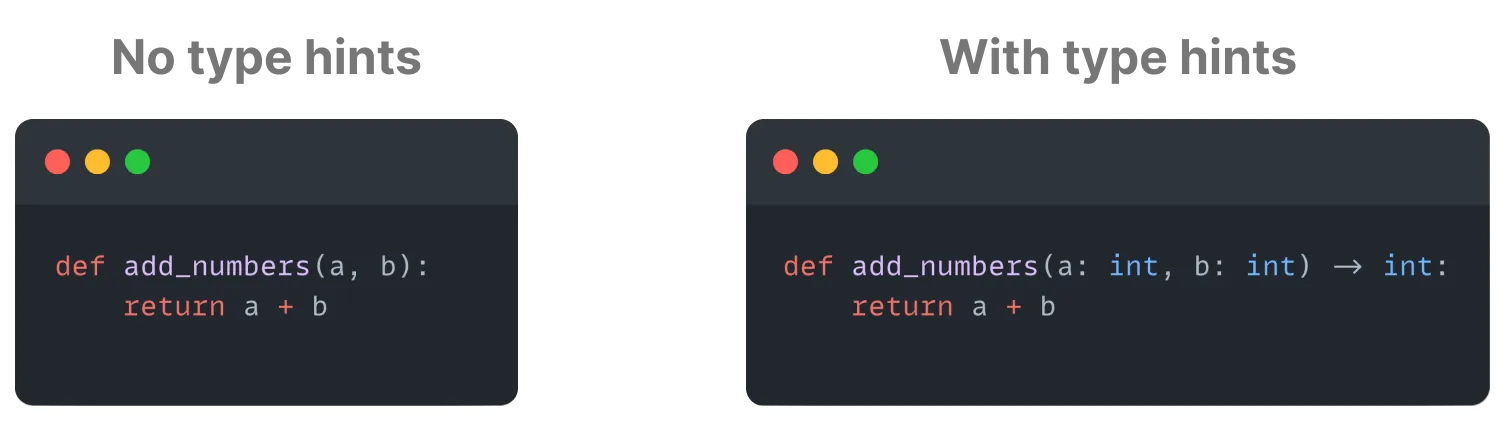
Pydantic
Pydantic ensures data meets certain rules before it's used. For instance, if we're expecting an email address, Pydantic checks that the input is a valid email format. This is especially useful when dealing with more complex data, like forms or JSON.

Input request
An input request is the data a client sends to the server, such as parameters, payloads, or files. The server processes this data to perform tasks like model predictions in a machine learning application.
LitServe simplifies input handling by efficiently processing various data types while ensuring correctness. It uses Python type hints and Pydantic for strong validation, making sure that incoming data follows the expected structure and format.
Output request
Output responses refer to the data sent from the server back to the client after processing the input request.
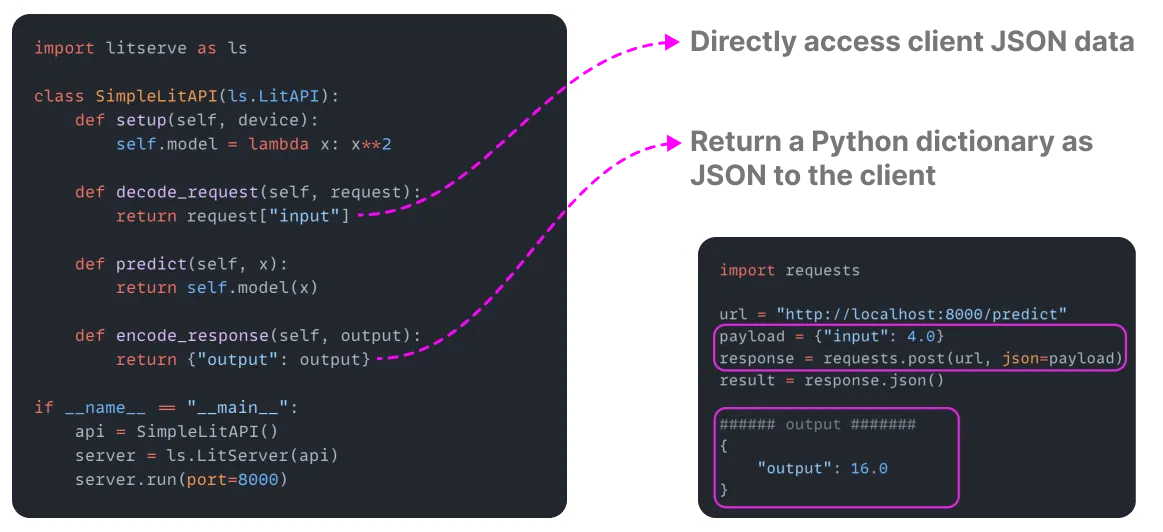
LitServe ensures that responses are properly structured and formatted, leveraging Python type hints and Pydantic models where needed. For instance, JSON responses can be directly returned by simply outputting a dictionary in the encode_response method.
OpenAPI and Swagger UI
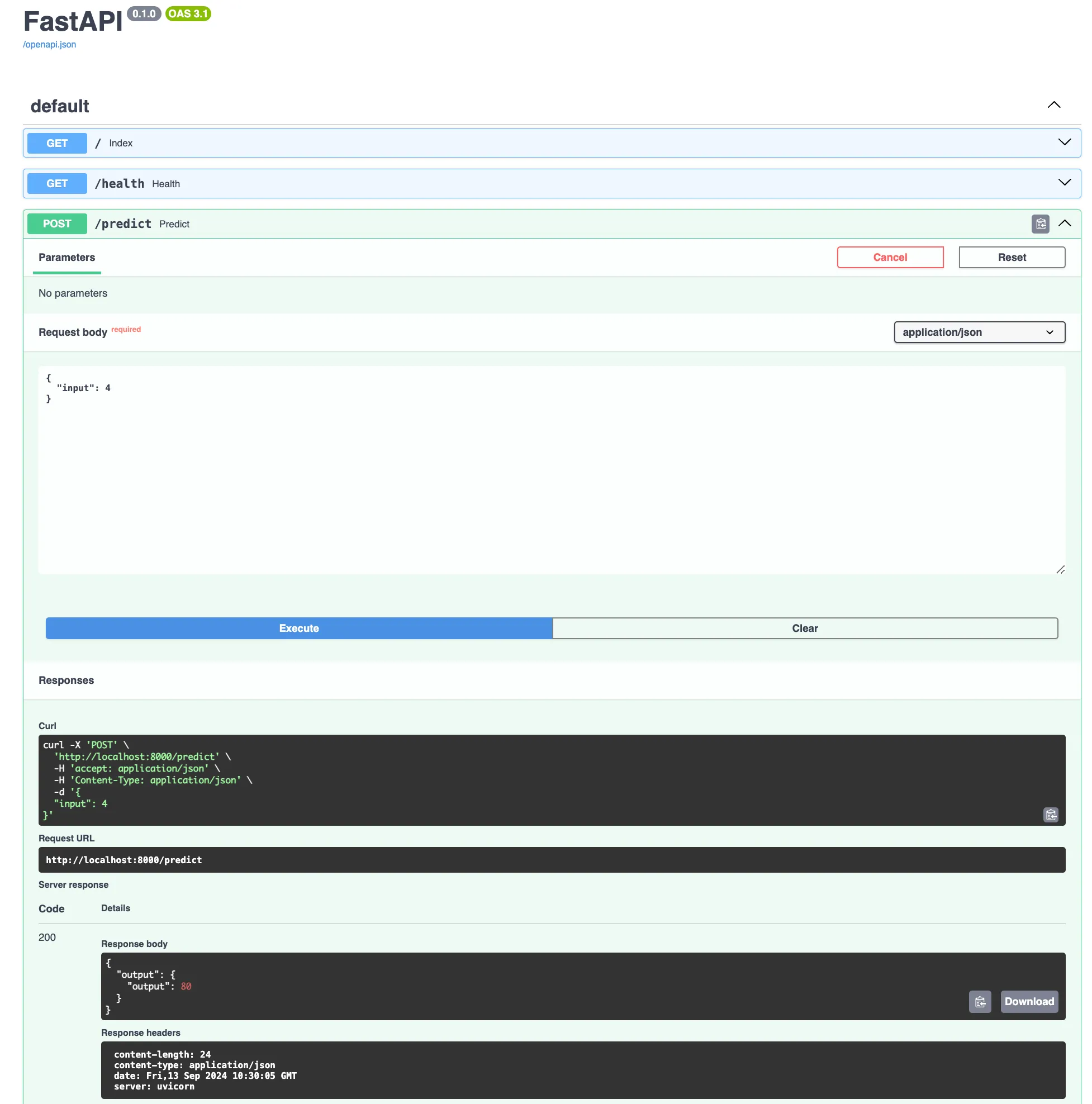
LitServe follows OpenAPI specification standards to ensure robust and consistent API design. Since LitServe is built on top of FastAPI, it is fully compliant with OpenAPI, making it easier to document, test, and integrate your APIs with various tools.
One of the key benefits of using LitServe is its automatic generation of interactive API documentation through Swagger UI. Once your server is up and running, you can access this documentation at http://localhost:8000/docs. This interface provides a clear overview of your API endpoints, request/response schemas, and allows for direct interaction with your API, simplifying both development and debugging processes.
Data formats
JSON data
LitServe fully supports JSON input and output. The request argument in decode_request is a dictionary that contains the client's request data. To return a JSON response, users can simply return a dictionary from encode_response, and LitServe will automatically format it as JSON.
Byte encoded image
LitServe supports image data input for computer vision or multiple-model servers. There are multiple ways to handle image input data such as byte encoded image and file upload. The following example shows how to use byte encoded image with LitServe.
Byte encoded images can be decoded in the decode_request step as follows:
from PIL import Image
import base64, io
import litserve as ls

class ImageAPI(ls.LitAPI):
    def setup(self, device):
        self.model = lambda x: x.size

    def decode_request(self, request):
        image = request["image_data"]
        image = base64.b64decode(image)
        image = Image.open(io.BytesIO(image))
        return image

    def predict(self, x):
        return self.model(x)

    def encode_response(self, output):
        return {"output": output}

if __name__ == "__main__":
    api = ImageAPI()
    server = ls.LitServer(api)
    server.run(port=8000)
We use the following client to query this server:
import base64
import requests

url = "http://127.0.0.1:8000/predict"
image_path = "image.jpg"

with open(image_path, "rb") as image_file:
    encoded_string = base64.b64encode(image_file.read()).decode("utf-8")

response = requests.post(url, json={"image_data": encoded_string})
print(response.json())
Upload image as file
LitServe also accepts file uploads as input. To enable this, add the FastAPI UploadFile type hint to the request argument in the decode_request method, as demonstrated below:
from PIL import Image
from fastapi import UploadFile
import litserve as ls

class ImageAPI(ls.LitAPI):
    def setup(self, device):
        self.model = lambda x: x.size  # Define a dummy model to return image size

    def decode_request(self, request: UploadFile):
        return Image.open(request.file)

    def predict(self, x):
        return self.model(x)

    def encode_response(self, output):
        return {"output": output}

if __name__ == "__main__":
    api = ImageAPI()
    server = ls.LitServer(api)
    server.run(port=8000)
We use the following client to query this server:
import requests

url = "http://127.0.0.1:8000/predict"
image_path = "image.jpg"

# Open the image file in binary mode
with open(image_path, 'rb') as image_file:
    files = {'request': image_file}
    response = requests.post(url, files=files)
print(response.content)
Upload file and JSON data
To upload a file alongside additional data, you can send the extra data as a JSON object. The JSON data is accessible by referencing the corresponding keys, while the file itself can be retrieved as shown below.
Here's an example for image handling:
from PIL import Image
import litserve as ls

class ImageAPI(ls.LitAPI):
    def setup(self, device):
        self.model = lambda x: x.size  # Define a dummy model to return image size

    def decode_request(self, request):
        # Access additional JSON data sent in the request
        print(request["model_name"])

        # Open and return the uploaded image file
        return Image.open(request["request"].filename)

    def predict(self, x):
        return self.model(x)

    def encode_response(self, output):
        return {"output": output}

if __name__ == "__main__":
    api = ImageAPI()
    server = ls.LitServer(api)
    server.run(port=8000)
The following example demonstrates how to send a request to the server, uploading an image file along with some JSON data:
import requests

url = "http://127.0.0.1:8000/predict"
image_path = "image.jpg"

# Open the image file in binary mode for upload
with open(image_path, 'rb') as image_file:
    files = {'request': image_file}
    # Send a POST request with the image and JSON data
    response = requests.post(url, files=files, data={"model_name": "resnet50"})

print(response.json())
Text data
Textual data input is widely used in applications like NLP, and chatbots. LitServe supports flexible handling of text data through simple strings, structured formats, or complex validation using JSON and Pydantic models.
Below is an example of how to decode text input from a JSON client request. In this example, the decode_request method extracts the text input from the JSON request, which is then processed by a simple model and returned in the response.
import litserve as ls

class TextAPI(ls.LitAPI):
    def setup(self, device):
        self.model = lambda x: len(x)

    def decode_request(self, request):
        return request["text_input"]

    def predict(self, x):
        return self.model(x)

    def encode_response(self, output):
        return {"output": output}

if __name__ == "__main__":
    api = TextAPI()
    server = ls.LitServer(api)
    server.run(port=8000)
We use the following client to query this server:
import requests

url = "http://127.0.0.1:8000/predict"

response = requests.post(url, json={"text_input": "This is an example!"})
print(response.json())
Pydantic input
Pydantic input allows for more complex validation and parsing of incoming data. By using Pydantic models as part of the decode_request method, you can define schemas for incoming requests. This ensures that the data adheres to the required structure and types, and any invalid input will automatically trigger a detailed error response.
The example below enforces that the client sends a JSON with input_text key containing a text that is at least 1 character and no more than 500 characters long.
from pydantic import BaseModel, constr
import litserve as ls

# Define a Pydantic model for input validation
class TextRequestModel(BaseModel):
    text_input: constr(min_length=1, max_length=500)

class TextAPI(ls.LitAPI):
    def setup(self, device):
        self.model = lambda x: len(x)

    def decode_request(self, request: TextRequestModel):
        return request.text_input

    def predict(self, x):
        return self.model(x)

    def encode_response(self, output):
        return {"output": output}

if __name__ == "__main__":
    api = TextAPI()
    server = ls.LitServer(api)
    server.run(port=8000)
We use the following client to query this server:
import requests

url = "http://127.0.0.1:8000/predict"

response = requests.post(url, json={"text_input": "This is an example!"})
print(response.json())
Conclusion
LitServe simplifies handling diverse data types like text, images, and JSON, solving common challenges in data validation and processing. By leveraging Python type hints and Pydantic models, it ensures reliable, error-resistant data format.
Was this page helpful?
Thanks for the feedback.