
Full control
LitServe provides the flexibility to serve models from any framework or domain, including text, image, or generative AI. It empowers users to build systems of any complexity without imposing limitations.
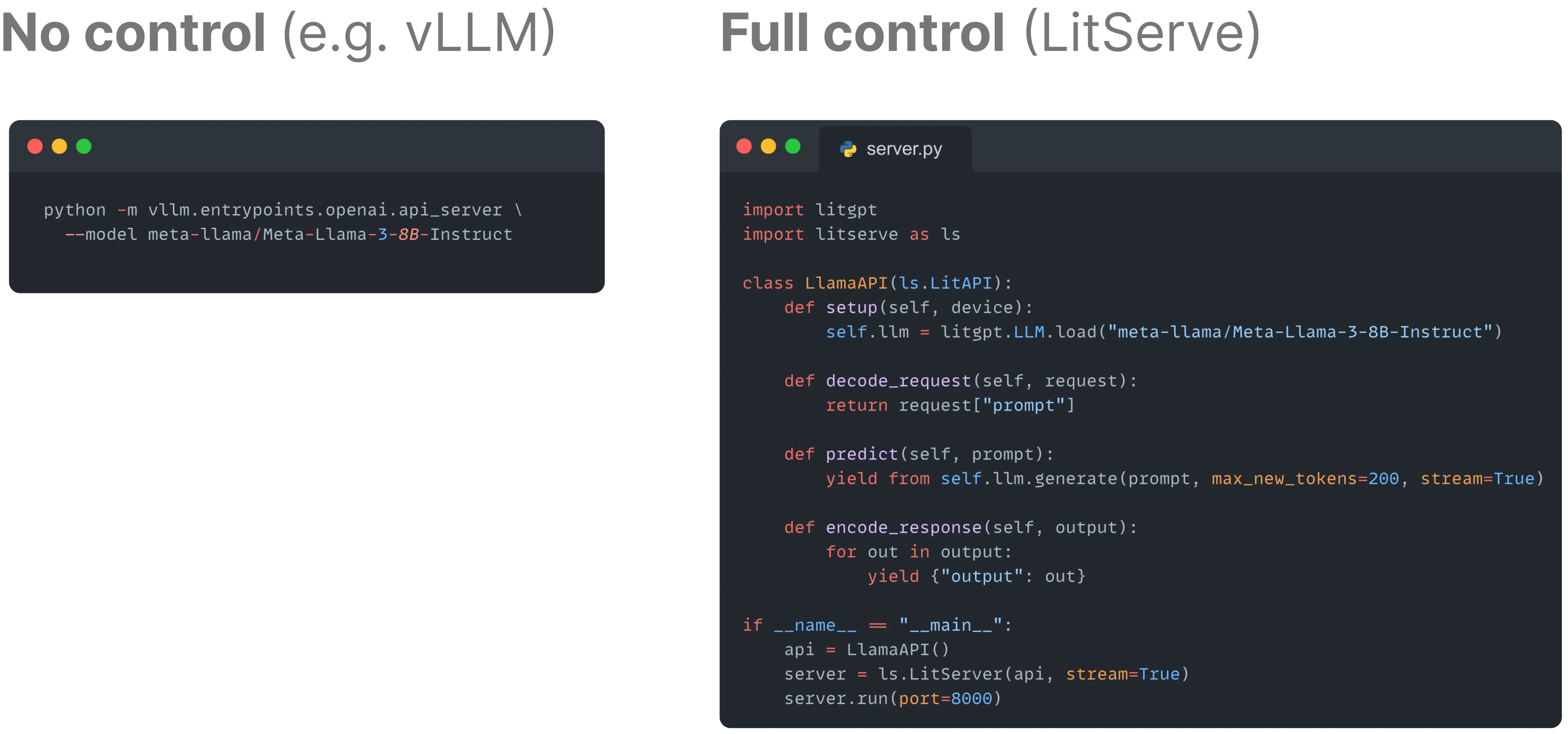
With LitServe, you have complete control over every stage of the model serving process, from decoding the request and making model predictions to formatting the response.
Background
What is full control?
Full control in LitServe means you can customize every aspect of the model serving process. Unlike other frameworks, LitServe allows you to define how data is processed, how predictions are made, and how responses are structured, giving you the flexibility to handle any model or application scenario.
Applications to LLMs
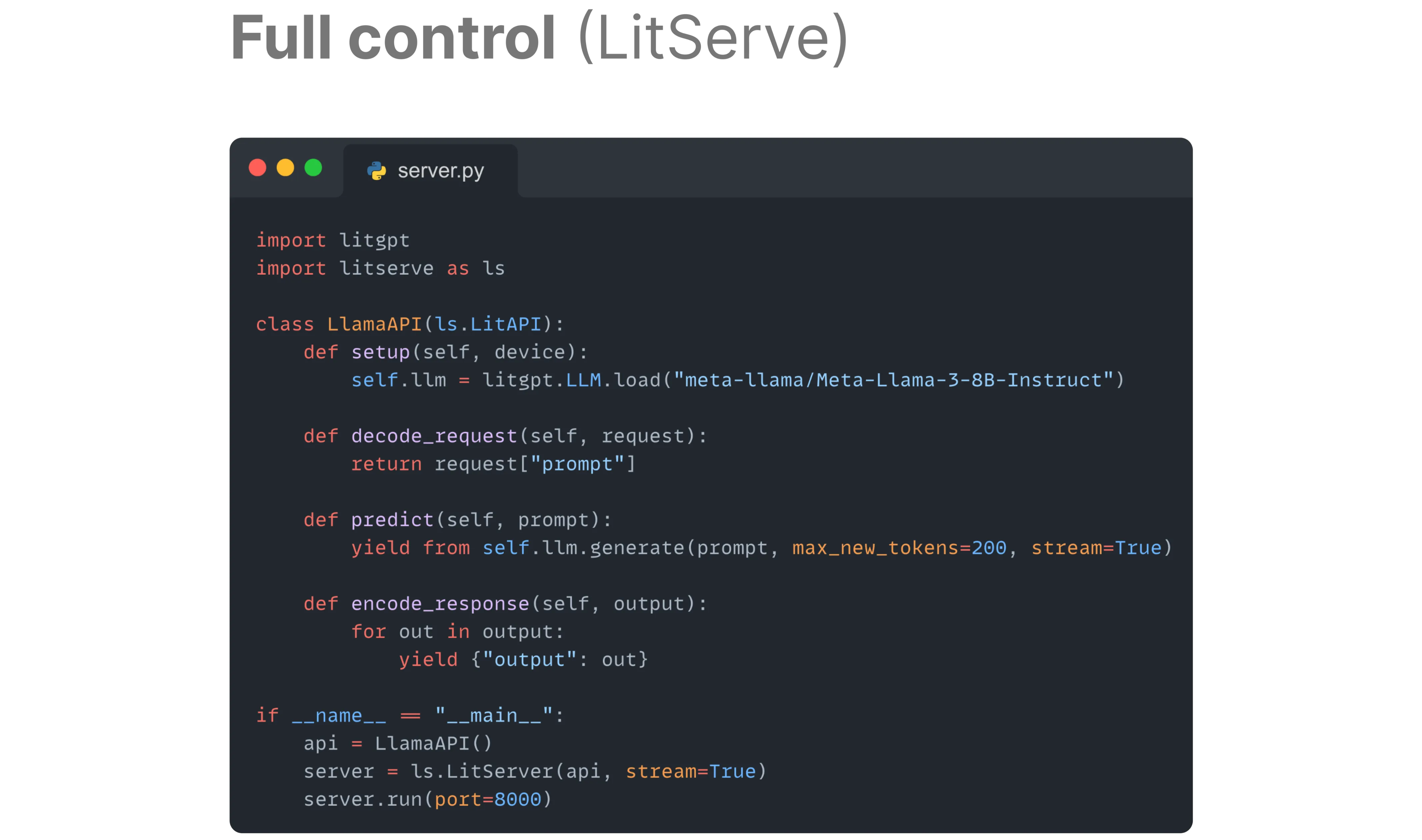
Large language models (LLMs) generate responses one token (approximately one word) at a time. LitServe provides the flexibility to stream the generated response or send everything at once.
Applications to multiple models
A multimodal architecture can process input data of one type and generate data of another type, such as text-to-image or text-to-speech. LitServe allows creating multiple models from various domains and provides ways to decode requests of multiple data types.
Full control with LitServe
Initialize models
LitServe gives users the flexibility to initialize a model from any domain or define multiple models in a single server.
To set up a model, use the LitAPI.setup method as follows:
import litserve as ls

class SimpleLitAPI(ls.LitAPI):
    def setup(self, device):
        # set up a model here
        self.model = lambda x: x**2

    def decode_request(self, request):
        return request["input"]

    def predict(self, x):
        return self.model(x)

    def encode_response(self, output):
        return {"label": output}

if __name__ == "__main__":
    api = SimpleLitAPI()
    server = ls.LitServer(api)
    server.run(port=8000)
Setting up multiple models is straightforward; define them in the setup method. The following example shows how two models can be defined to build a multiple model server:
import litserve as ls

class SimpleLitAPI(ls.LitAPI):
    def setup(self, device):
        # set up multiple models
        self.embedding_model = lambda x: [1, 2, 3, 4]
        self.classification_model = lambda x: "PREDICTED_LABEL"

    def decode_request(self, request):
        return request["prompt"]

    def predict(self, prompt):
        embedding = self.embedding_model(prompt)
        prediction = self.classification_model(embedding)
        return prediction

    def encode_response(self, output):
        return {"label": output}

if __name__ == "__main__":
    api = SimpleLitAPI()
    server = ls.LitServer(api)
    server.run(port=8000)
Handle request data
LitServe allows users to decode request inputs of any type, such as JSON, image, audio, or video, by implementing the LitAPI.decode_request method. This is particularly useful in the case of a multiple model server.
LitServe also accepts multiple input data types. For example, the following server loads a number, text prompt, and an image.
import PIL, base64, io
import litserve as ls

class SimpleLitAPI(ls.LitAPI):
    def setup(self, device):
        self.model = lambda x: x**2

    def decode_request(self, request):
        # load a number
        number = request["input"]

        # load a prompt
        prompt = request["prompt"]

        # load an image
        image = request["image_data"]
        image = base64.b64decode(image)
        image = PIL.Image.open(io.BytesIO(image))
        return number

    def predict(self, x):
        return self.model(x)

    def encode_response(self, output):
        return {"label": output}

if __name__ == "__main__":
    api = SimpleLitAPI()
    server = ls.LitServer(api)
    server.run(port=8000)
Control model prediction
LitServe provides the LitAPI.predict method to define the handling logic for model predictions. LitServe doesn't require you to return the model prediction in a specific way. For example, given an image classification model, the model can either return the probability of the predicted class or just the class label.
The following example shows how to handle model prediction:
import random
import litserve as ls

class SimpleLitAPI(ls.LitAPI):
    def setup(self, device):
        # model that returns a number between 0 and 1
        self.model = lambda x: random.random()

    def decode_request(self, request):
        return request["input"]

    def predict(self, x):
        prediction = self.model(x)
        if prediction > 0.5:
            return "Label 1"
        else:
            return "Label 2"

    def encode_response(self, output):
        return {"label": output}

if __name__ == "__main__":
    api = SimpleLitAPI()
    server = ls.LitServer(api)
    server.run(port=8000)
Track request context
LitServe enables storing and sharing request data across different stages of prediction: decode_request, predict, and encode_response.
LitAPI offers a unique keyword argument, context, which retains data throughout the request's lifespan. You can include this argument in decode_request, predict, and encode_response, and LitServe will inject a shared dictionary as the context value. This allows to store some data in one method and utilize it in another. The lifespan of this shared dictionary begins before decode_request and concludes after encode_response.
The following example shows that you can store a value in the context dictionary while decoding the request and access it in a later stage during encode_response.
import litserve as ls

class TrackLitAPI(ls.LitAPI):
    def setup(self, device):
        self.model = lambda x: x**2

    def decode_request(self, request, context):
        # store a value in context
        context["RANDOM_VALUE"] = 10
        return request["input"]

    def predict(self, x):
        return self.model(x)

    def encode_response(self, output, context):
        # retrieve a value from context
        value = context["RANDOM_VALUE"]
        return {"output": value * output}

if __name__=="__main__":
    api = TrackLitAPI()
    server = ls.LitServer(api)
    server.run(port=8000)
In case of batching, the context will store a list of context across all the requests.
import numpy as np
import litserve as ls

class BatchedAPI(ls.LitAPI):
    def setup(self, device) -> None:
        self.model = lambda x: x**2

    def decode_request(self, request):
        return np.asarray(request["input"])

    def predict(self, x_batch, context):
        for c, x in zip(context, x_batch):
            c["input"] = x
        return self.model(x_batch)

    def encode_response(self, output, context):
        input = context["input"]
        return {"output": input}
Customize endpoint path
The default path for a LitServe endpoint is /predict. Not all servers "predict", some might "classify" or "embed" and it's useful to customize this path in those cases.
Customize the path as follows:
import litserve as ls
from litserve.test_examples import SimpleLitAPI

if __name__ == '__main__':
    api = SimpleLitAPI(api_path="/my_api/classify")
    server = ls.LitServer(api)
    server.run(port=8000)
Track active requests
Track the total number of active requests in the queue across API servers by setting track_requests=True in the LitServer class. The number of active requests can be accessed by callbacks using the on_request hook, as shown in the example below:
import litserve as ls

class RequestTracker(ls.Callback):
    def on_request(self, active_requests: int, **kwargs):
        # do something with active_requests
        print(f"Active requests: {active_requests}", flush=True)

class SimpleLitAPI(ls.LitAPI):
    def setup(self, device):
        self.model = lambda x: x ** 2

    def decode_request(self, request):
        return request["input"]

    def predict(self, x):
        return self.model(x)

    def encode_response(self, output):
        return {"output": output}

if __name__ == '__main__':
    api = SimpleLitAPI()
    server = ls.LitServer(api, callbacks=RequestTracker(), track_requests=True)
    server.run()
Was this page helpful?
Thanks for the feedback.