
Websockets
WebSocket is a communication protocol that provides a full-duplex, persistent communication channel over a single TCP connection. It is designed to be implemented in web browsers and web servers, but it can be used by any client or server application.
In simple terms, WebSockets allow for a two-way, interactive communication session between a user's browser and a server. This means the server can push messages to the client at any time, without the client having to request it.
Traditional web communication relies on the HTTP protocol, which follows a strict request-response model:
- The client sends an HTTP request to the server.
- The server processes the request and sends an HTTP response back.
- The connection is closed.
For applications requiring real-time data (like chat apps or live stock tickers), this model is inefficient. Developers had to use workarounds like polling, where the client repeatedly asks the server for new data, creating significant network overhead and latency.
Example
This example demonstrates a basic WebSocket server using FastAPI. It defines an endpoint that accepts incoming client connections, establishing a persistent channel to echo back any messages it receives.
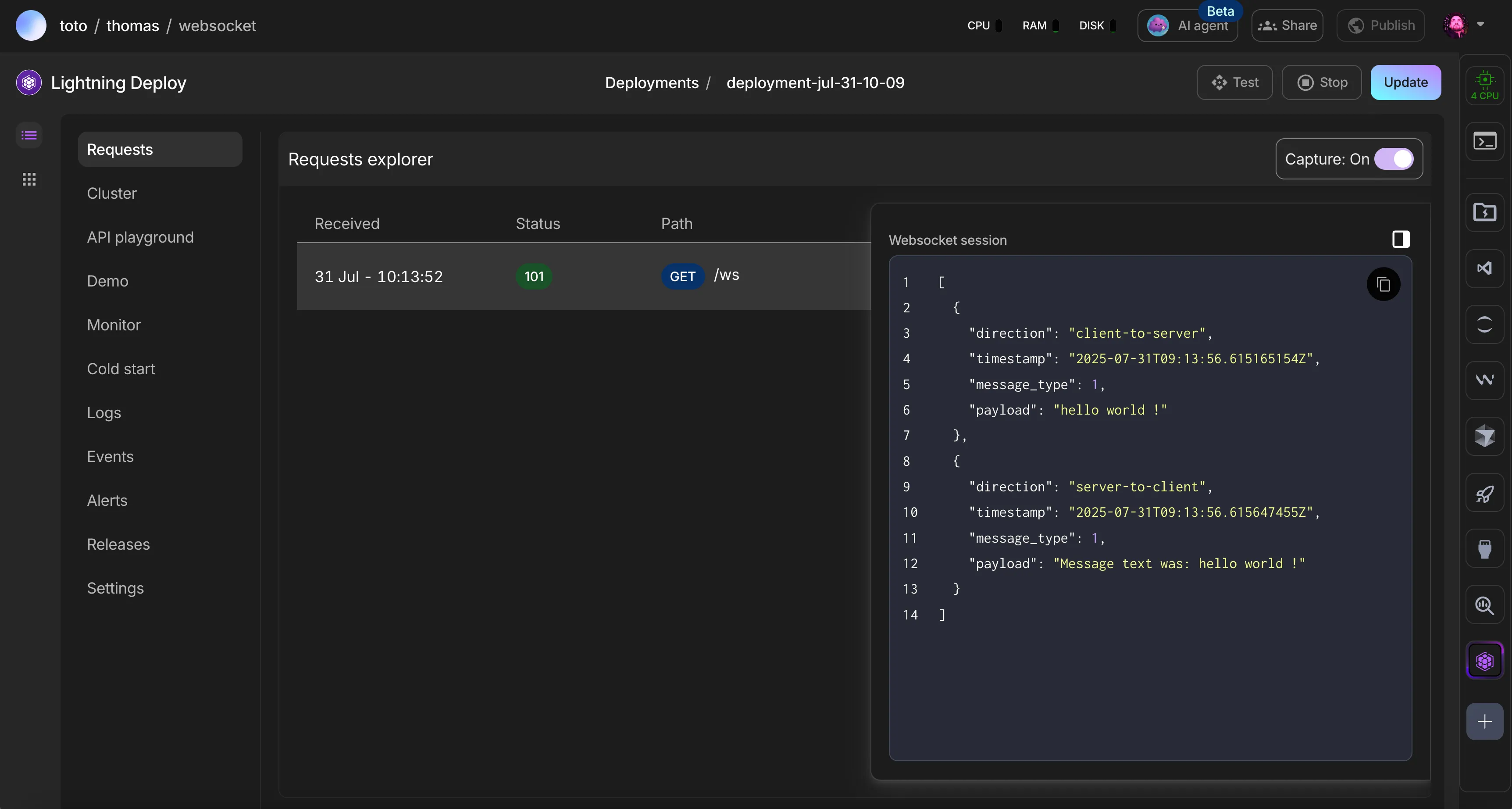
This script creates a simple web server using the FastAPI framework. It establishes a WebSocket endpoint that listens for incoming text messages, echoes them back to the sender with a prefix, and gracefully handles client disconnections.
from fastapi import FastAPI, WebSocket, WebSocketDisconnect

app = FastAPI()

# This function will handle the lifecycle of a client connection.
@app.websocket("/ws")
async def websocket_endpoint(websocket: WebSocket):
    # This completes the WebSocket handshake.
    await websocket.accept()

    try:
        # The connection stays open until the client disconnects or an error occurs.
        while True:
            data = await websocket.receive_text()
            await websocket.send_text(f"Message text was: {data}")
    except WebSocketDisconnect:
        print("Client disconnected")
This script is a command-line WebSocket client that connects to a server and allows for real-time, two-way communication. It uses Python's asyncio library to concurrently listen for messages from the server and send user-typed messages, ensuring a non-blocking, interactive experience.
import asyncio
import websockets


# This function runs concurrently to receive and print messages from the server.
async def listener(websocket):
    """Listens for messages from the server and prints them."""
    try:
        async for message in websocket:
            print(f"\n<<< Received: {message}")
            print("Enter a message to send (or 'exit' to quit): ", end="", flush=True)
    except websockets.exceptions.ConnectionClosed:
        print("\nConnection to server closed.")
    except Exception as e:
        print(f"Listener error: {e}")


# This function runs concurrently to read user input and send it to the server.
async def sender(websocket):
    """Prompts the user for input and sends it to the server."""
    while True:
        try:
            message = await asyncio.to_thread(input, "")
            if message.lower() == "exit":
                print(">>> Closing connection...")
                break
            await websocket.send(message)
        except (KeyboardInterrupt, EOFError):
            print("\n>>> Closing connection...")
            break


async def main():
    """Main function to run the websocket client."""
    websocket_uri = "ws://127.0.0.1:8000/ws" # Using a standard local address

    try:
        async with websockets.connect(websocket_uri) as websocket:
            print("Successfully connected to the WebSocket server.")
            print("Enter a message to send (or 'exit' to quit): ", end="", flush=True)

            # This allows sending and receiving messages simultaneously.
            listener_task = asyncio.create_task(listener(websocket))
            sender_task = asyncio.create_task(sender(websocket))

            # If the user types 'exit' (sender) or the server connection closes (listener),
            # the program will proceed to shut down.
            done, pending = await asyncio.wait(
                [listener_task, sender_task],
                return_when=asyncio.FIRST_COMPLETED,
            )

            for task in pending:
                task.cancel()

    except websockets.exceptions.ConnectionClosedError:
        print(f"Error: Connection to {websocket_uri} failed. Is the server running?")
    except ConnectionRefusedError:
        print(f"Error: Connection refused. Please ensure the server is running on {websocket_uri}.")
    except Exception as e:
        print(f"An unexpected error occurred: {e}")
    finally:
        print("Client has disconnected.")

if __name__ == "__main__":
    try:
        asyncio.run(main())
    except KeyboardInterrupt:
        print("\nClient shut down by user.")
Was this page helpful?
Thanks for the feedback.