
Billing
Credits
Users get 1 free 4-CPU Studio to code in and run workloads on. The remaining CPUs and GPUs will be billed as advertised. The first 10 GB of storage, across the Drive and container images, is free. Credits can be used to scale up compute to large CPUs and GPUs and store production-level datasets within the Lightning AI platform.
Value conversion

A GPU that costs 1.17 credits / hr is the equivalent of $1.17 / hr. Explore our pricing page for more information on CPU and GPU rates.
How am I billed?
There are 2 activities that consume credits, running machines (in Studios or Jobs) and storage (above 10 GB). Credits are billed per second when running a Studio or Job that is not marked as "Free".
Additionally, the first 10 GB of storage, across the Drive and container images, is unbilled. After that users will be billed at a rate of $0.10 / GB / month (billed daily).

Consult this guide to understand better how to optimize cost management.
How do free credits work?
Eligible free plan users receive complimentary credits to explore Lightning AI. Free credits can be used for compute, inference, and storage. Every account also includes one free CPU studio for coding. Any additional CPU studios or other machines are billed at the listed rates.
Conditions for free credits
Free credits are promotional, non-transferable, and do not accumulate.
Lightning AI may change or limit free credit grants, eligibility, usage rules, or expiration terms at any time.
Purchasing credits
If purchased, Lightning AI credits expire after 1 year. For example, a Lightning Pro includes 40 credits per month. These credits expire after 1 year. Renewing a subscription adds another 40 credits.
When credits are running low, Lightning AI will warn users and then attempt to gracefully shut down all workloads and Studios. To continue using Lightning AI, either wait for additional free credits or purchase additional credits. Many customers take advantage of signing up for a Pro monthly subscription because it comes with 40 credits and access to much more powerful GPUs and other features!
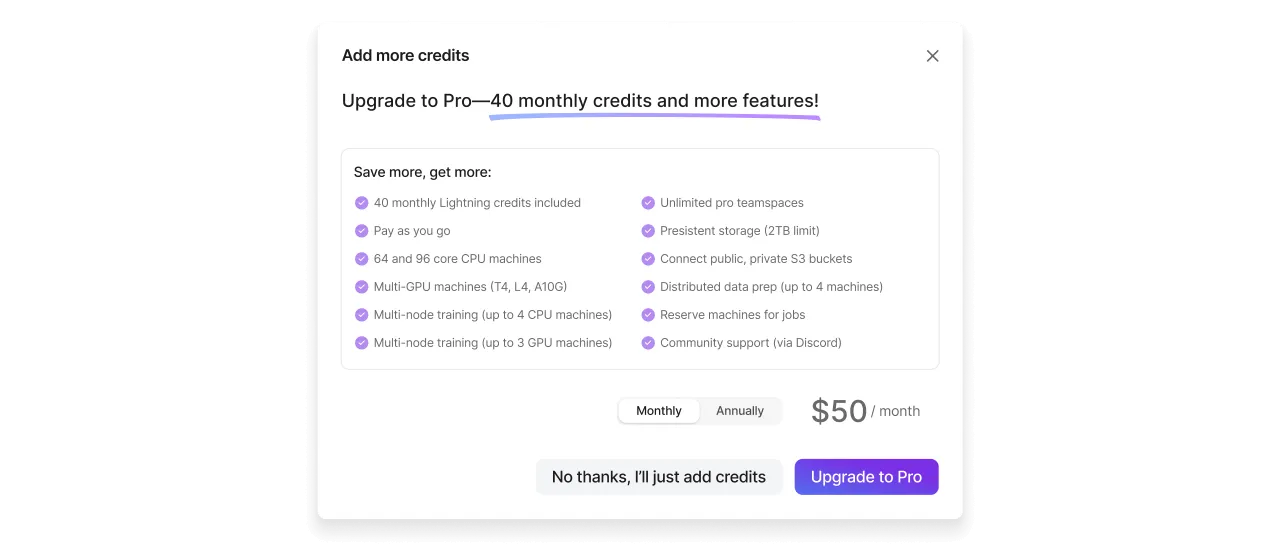
To explore Lightning Pro or one of our paid subscriptions, contact us and a team member will help answer your questions.
Storage
Storage counts the Drive and the container images you push to the Lit container registry, except images stored in your own cloud account with BYOC. Your data connections are not billed. The first 10 GB of storage is free. After that, it's billed at a rate of $0.10 / GB / month (billed daily). Each tier also has a limit on total storage.
Free: 200 GB total storage limit (only first 10 GB free)
Pro: 200 GB total storage limit (only first 10 GB free)
Teams: 2 TB total storage limit (only first 10 GB free)
Enterprise: Unlimited storage (only first 10 GB free)
Support
For any billing related issues, contact us via email at support@lightning.ai. Visit Get help for more details.
Was this page helpful?
Thanks for the feedback.